
Following the changes in the cartographic production, the new Layout presents in gvSIG 2.1. The grid generating function is greatly improved. Now we will be able to configure almost all visual parameters and thus we can cover many of the needs that gvSIG community users had demanded.
We will see, with a very easy example, the new functionality of grid configuration.
We start from a simple Layout where we will add a grid:
 If you were surprised to see the Table of Contents embedded in the document Layout, it is because you have not read last week´s post.
The first thing we do is select the View that is inserted on our Layout and display its context menu -clicking on it with the right-button. Among the options that it shows us, we select “Properties”. gvSIG will show a window and this one will be similar to the following image, where we can configure all the parameters related to a View:
 In this case we are interested in grid configuration. It is located at the bottom of the window. We enter in settings; we have to press the corresponding button. This will open a new window where you can configure every parameter of the grid:
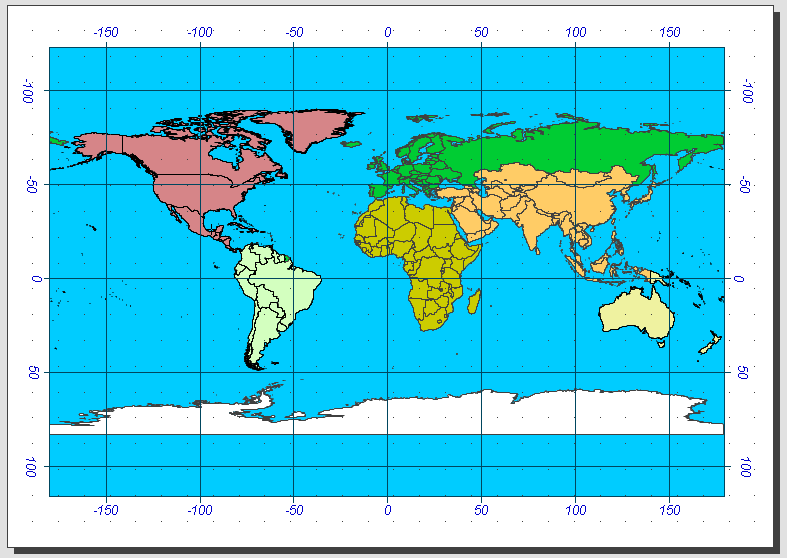
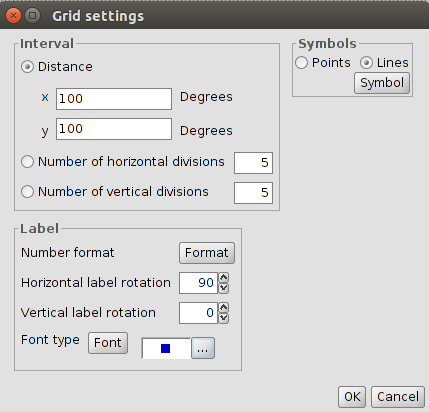 In our case, we will select that the grid will be symbolized by lines 100 degrees for both horizontal and vertical intervals. Also we will indicate the horizontal labels are rotated 90 ° (the rotation of this feature was one of the most requested by users). We configure the remaining parameters (font, size, color …) and we have our grid ready. Simple, really?


 Alvaro
 Amparo Cisneros
 adelrey
 Alegria
 asoredesocial2006
 Augusta
 christinesig
 cordin
 csanper
 danielvicb
 dispiste
 edmarmoretti
 elenasanchez232
 eliazerk
 fjsolis
 Gabi
Gabi ggowtham
 Giuliano Ramat
 Valenty
 Georg Sedlmeir
 hydrologiclady
 jgalans
 Joaquin del Cerro
 Juan Lucas Domínguez Rubio
 jolicar
 josebadia
 Jorge Piera Llodrá
 Jordi Torres
 Chevi
Chevi learozz
 leoruizb
 Alonso Morilla
 Lluís Marqués
 martapacoret
 Óscar Martínez
 mateoboudon
 Mario
Mario Mario Chaveli
 mjlobato76
 Manuel
 mmontesinos
 moovida
 Nacho Varela
 nbrodin
 André
André piotrpachol
 psanxiao
 Sergio Acosta y Lara
 Spatioblog
 Sergio Acosta y Lara
 uliwerz
 Victor Acevedo
 Viqui
Viqui volaya

 gvSIG blog