Disponível o manual de gvSIG Desktop em Português

À alguns meses publicamos o manual revisto e completo de gvSIG Desktop, adaptado às características da última versão para o gvSIG 2.2. Neste momento, fizemos um pedido à comunidade gvSIG para poder ter disponível noutros idiomas.

No decorrer desta semana, estamos a finalizar a construção do manual na versão Portuguesa. No entanto, ainda falta alguns detalhes para que esteja completo, mas ficará tudo pronto esta semana.

Por isso, incentivamos a que nos ajudem a rever o manual, para identificar possíveis erros e/ou falhas.

Quero aproveitar para agredecer o trabalho das pessoas que tornaram possível que este manual esteja mais completo na versão Portuguesa.

Jorge Getulio Vargas Freitas, Eduardo Freitas, Rogério Santos Pereira, Eliacer, Luís Ferla, Davide Calheiros e Tiago André Conceição.

Descarregar: http://downloads.gvsig.org/download/gvsig-desktop/dists/2.2.0/docs/gvsig-2.2.0-doc-1.0.0-pt.pdf

Posted in gvSIG Desktop, portuguese, technical collaborations, testing | Tagged | 3 Comments

¿Neutralidad Tecnológica o Sonambulismo tecnológico?

¿Y cuantas veces no dejamos de oír hablar de la neutralidad tecnológica como posicionamiento razonable? Pues bien, la cuestión de la tecnología no es algo ‘tan neutral’. El discurso de la neutralidad tecnológica plantea la inevitabilidad del desarrollo tecnológico tal cual es y que iría asociado a un determinismo tecnológico y finalmente a un cierto determinismo histórico. Es decir, las elecciones entre las distintas opciones tecnológicas que pueden plantearse afectan a la distribución de poder, autoridad y privilegio dentro de una comunidad. Así, la decisión de adoptar una tecnología u otra y las innovaciones o modificaciones tecnológicas sobre las ya existentes, generan profundos cambios con efectos deseados y no deseados.

Utilizando la expresión de Langdon Winner, los que hablan de de neutralidad tecnológica más bien están adoptando una actitud de sonambulismo tecnológico ante el desarrollo y la evolución de la tecnología, sector estratégico del Siglo XXI. No es la Neutralidad, es la Soberanía, sonámbulos.

Posted in opinion | 3 Comments

#11gvSIG: Program available

Inicio_web_11as_Jornadas_Int_gvSIG_en

The program of the 11th International gvSIG Conference, that will be held from December 2nd to 4th at La Petxina Sports-Cultural Complex (Valencia – Spain), is now available.

The program is available with the paper sessions and workshops on the Conference web page.

All the presentations given at the Conference on Wednesday and Thursday, and the workshops given in Friday, will have simultaneous interpretation (Spanish-English and English-Spanish).

Registrations are free of cost (limited capacity) and must be done through the application form on the Conference web page.

In the next days we will give you more information about the conference at the gvSIG blog, including the applications to be installed previously in order to follow the workshops.

Posted in community, english, events, gvSIG Desktop, gvSIG Educa | Tagged | 1 Comment

gvNIX 1.5.1.RC1 available

gvnix_logo

The gvSIG Association is pleased to announce that first gvNIX 1.5.1 Release Candidate (gvNIX 1.5.1 RC1) has been released.

gvNIX is an open source tool for rapid application development (RAD) with which you can create Java web applications in minutes, allowing a fast development of geoportals for visualization and data management.

This release is built over Spring Roo 1.3.2. It includes important bug fixes and many improvements.

This new release includes highlights improvements on Geo component with the the improvements on Leaftlet library and bug fixes on the Datatables component.

gvNIX 1.5.1.RC1 can be downloaded from the gvNIX website, where you can consult its novelties.

Posted in english, opinion, testing | 1 Comment

#11gvSIG: Code Sprint

network_communication

Durante las 11as Jornadas Internacionales de gvSIG se realizará un Code Sprint para desarrolladores de gvSIG Desktop, tanto de Java como de Python.

Aprovechando la asistencia a las #11gvsig de una parte importante de los desarrolladores de gvSIG se ha pensado poner en marcha esta actividad que sirva de punto de encuentro y oportunidad para que todos ellos se conozcan un punto más.

Durante esta actividad contaremos con la presencia de Joaquín del Cerro, responsable de arquitectura y desarrollo de gvSIG, y Óscar Martínez, el profesor del curso gratuito de scripting con Python sobre gvSIG.

Algunos datos para los interesados en participar:

– Fecha: viernes 4 de diciembre (de 9:00  a 14:00)

– Lugar: En el mismo lugar donde se celebra el resto de las #11gvsig. Complejo Deportivo-Cultural Petxina.

– ¿Qué llevar?: un ordenador portátil, tu entorno de desarrollo de gvSIG configurado (para Java) y muchas ganas de pasar unas horas desarrollando con gvSIG.

– ¿Dónde me inscribo?: además de inscribirte a las jornadas, debes mandarnos un email a info@gvsig.com indicando que quieres participar, tus datos, y en qué estás interesado en trabajar durante el Code Sprint.

Posted in community, development, events, gvSIG Desktop, scripting, spanish | Tagged | 1 Comment

Recopilación de proyectos finales del MOOC de Scripting en gvSIG (I)

post-scriptingmoocPara finalizar el MOOC de Scripting en gvSIG y obtener el certificado, hay que realizar un proyecto final en el que demuestres los conocimientos adquiridos durante el curso. La temática es libre, así como su dificultad. Cada alumno elige el problema que quiere resolver y la forma en que plantean resolverlo.

Estos son algunos de los mejores proyectos realizados durante el curso:


Informe generado en fecha 09/01/15 y hora 23:01:24

TREN SUBURBANO
Proyecto: <gvsig.Project object at 0x25>

DATOS INTRODUCIDOS:
-> Velocidad máxima: 29[km/h]
-> Aceleración para aumentar velocidad: 1.3[m/s^2]
-> Aceleración para disminuir velocidad: -0.5[m/s^2]
-> Tiempo de interés: 0[hs] 15[min]

Longitud total de la vía férrea: 44169.4323188[m]
Tiempo inicial: 0.0[min]

La longitud del tramo entre las estaciones Estacion_Central_San_francisco y Parque_Caballero es de 790.484440472[m]
..es suficiente para alcanzar 29.0[km/h], mantenerlo por un tiempo y luego frenar completamente
Llega a la estación Parque_Caballero en el instante 0[h] 1.82138248515[min]
Tiempo de parada: 0.25[min]
En el instante 0[h] 2.07138248515[min] parte de la estación Parque_Caballero


  • Script: Convertir capas de polígonos a líneas y viceversa
  • Realizado por: Dr. D. Santos Fernandez Noguerol de GISTools
  • Resumen: Tiene por objeto la conversión de una capa de polígonos
    a otra de líneas y viceversa conservando, además de las formas geométricas,
    los valores de la tabla de atributos original.


7


Recordar que si estás interesado en aprender a programar así, el MOOC de Scripting es gratuito y se encuentra siempre en abierto. Está orientado para usuarios sin conocimientos previos en programación (siempre ayuda conocer algo de Python) y contamos con un foro que es una fuente muy valiosa de conocimiento (al cual siempre estoy atento a responder dudas), en el que podrás consultar rápidamente con otros alumnos. Puedes inscribirte e ir al ritmo de aprendizaje que más cómodo te sea.

Lo mismo, si queréis optar al certificado, solo hay que completar el curso y abonar una cantidad de 40€, con esto realizaremos una corrección de todos los ejercicios que realicéis y un seguimiento personalizado.

Si has realizado scripts por tu cuenta y quieres subirlos al Outreach de gvSIG, simplemente ponte en contacto con nosotros a través de este email.

¡Más proyectos próximamente!

Posted in gvSIG Desktop, scripting, spanish | 5 Comments

Disponibles ponencias Jornadas gvSIG Perú y Jornadas gvSIG LAC

Con un mes de diferencia se celebraron las 2as Jornadas gvSIG Perú y las 7as Jornadas gvSIG de Latinoamérica y Caribe (México).

Hoy se ha anunciado que ya están disponibles las ponencias presentadas en las Jornadas gvSIG de Perú. Aprovechamos también para recordad que recientemente se publicaron las ponencias de las Jornadas gvSIG LAC.

Entre ambos eventos se presentaron más de 50 trabajos, que ahora están disponibles para su libre consulta.

Comunicaciones Jornadas gvSIG Perú: http://www.gvsig.com/es/eventos/jornadas-peru/2015/comunicaciones

Comunicaciones Jornadas gvSIG LAC: http://www.gvsig.com/es/eventos/jornadas-lac/2015/comunicaciones

Y si quieres asistir a unas jornadas gvSIG, recuerda que en breve se celebran las 11as Jornadas Internacionales de gvSIG.

Posted in events, spanish | 3 Comments

Editing Spreadsheets from gvSIG Scripting for reporting

Following up on last week´s topic about Automate-reporting-in-gvsig-using-scripting, we are going to explain how can we make the same but using a spreadsheet file template (ODS).

In the previous post, we explained how to install jOpendocument library and how to download all the needed material for running the script.

For this example we are going to use the file located at C:\gvsig_informes\plantilla_invoice.ods.  There is no need for having any layer loaded in gvSIG.

If we use Linux or load the file in another place of our disk, we only should change the script path which makes reference to the spreadsheet template: pathTemplate. There are two, one input file plantilla_invoice.ods, and another one for the output file that we can save whenever we want.

The following script uses the jOpendocument library to modify the ODS file, assigning to the cells the required values. These values can be extracted from the information of our layers, as we explained in the previous post.

The template is based on the one used in the documentation of jOpendocument. This script is based on the example about modify an existent spreadsheet, but there is more, for example, create a new spreadsheet.

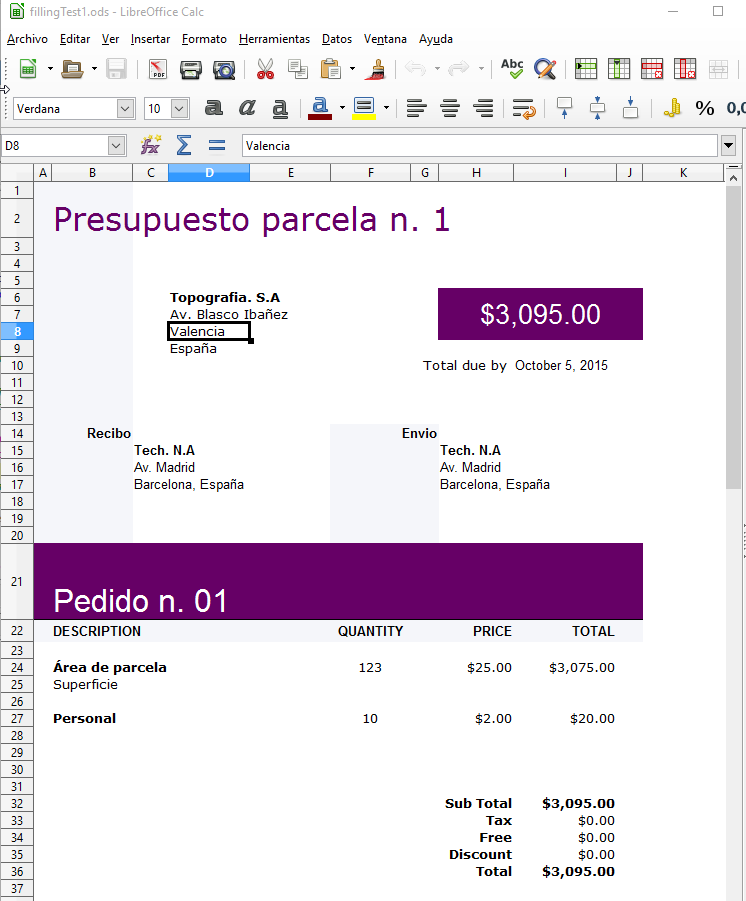
When the script is executed correctly, LibreOffice will be opened with the created file. If is like this case, that the spreadsheet includes formules (additions, multiplications,…) we need to press in LibreOffice Ctrl+Shift+F9 to refresh and update all the spreadsheet calculations. We will see how some cells will change.

The result would be a file similar to:

2015-10-05 15_57_38-fillingTest1.ods - LibreOffice Calc

The code is the following, only you need to make sure that the paths are correct:

from gvsig import *

from java.io import File
from java.util import Date

from org.jopendocument.model import OpenDocument
from org.jopendocument.dom.spreadsheet import SpreadSheet
from org.jopendocument.dom import OOUtils

def main(*args):
    #Editing example of ODS files with jOpenDocument
    
    #based on http://www.jopendocument.org/start_spreadsheet_2.html
    #template files http://www.jopendocument.org/downloads.html

    pathTemplate = r&quot;C:/gvsig_informes/plantilla_invoice.ods&quot;
    pathOutput = r&quot;C:/gvsig_informes/resultado/fillingTest1.ods&quot;

    #Access to spreadsheet and sheet number
    file = File(pathTemplate)
    sheet = SpreadSheet.createFromFile(file).getSheet(0)

    #Set actual date in I10 cell
    sheet.getCellAt(&quot;I10&quot;).setValue(Date())

    #Title
    sheet.getCellAt(&quot;B21&quot;).setValue(&quot;Pedido n. 01&quot;)
    
    #Modify the value of the cell 1,1. It would be B2
    sheet.setValueAt(&quot;Presupuesto parcela n. 1&quot;, 1, 1)

    #Some modifications to the cells
    sheet.getCellAt(&quot;F24&quot;).setValue(123)
    
    sheet.getCellAt(&quot;B27&quot;).setValue(&quot;Personal&quot;)
    sheet.getCellAt(&quot;H27&quot;).setValue(2)
    sheet.getSpreadSheet().getTableModel(&quot;Products&quot;).setValueAt(10, 5, 4) #F27

    #Save file
    outputFile = File(pathOutput)
    OOUtils.open(sheet.getSpreadSheet().saveAs(outputFile))

We hope that it would be helpful for reporting and to show the potential of gvSIG Scripting for using external libraries.

Any question about it, you can comment in here or in the lists.

Posted in community, development, english, gvSIG Desktop, gvSIG development, scripting | 1 Comment

Cursos de gvSIG, PostGIS, i3Geo y geoprocesamiento avanzado, en español y portugués

Ya están abiertas las inscripciones para los cursos a distancia de gvSIG-Training, que forman parte de la oferta del Programa de Certificación de la Asociación gvSIG.

A diferencia de las convocatorias anteriores, la modalidad de inscripción pasa a ser de matricula abierta para la mayoría de los cursos, por lo que el alumno podrá matricularse y comenzar el curso cuando lo desee. Los cursos disponibles actualmente son:

Cursos gvSIG general:

  • gvSIG 2.x para usuarios (Idioma: Español). Duración: 10 semanas. Créditos para Certificación Usuario gvSIG: 90. Precio: 195 euros. Profesores Titulares: Mario Carrera, Raúl Casado.

Cursos gvSIG aplicado:

  • gvSIG aplicado a la Gestión de Pavimentos y Vialidad (Idioma: Español). Duración: 4 semanas. Créditos para Certificación Experto gvSIG: 40. Precio: 190 euros. Profesor Titular: Josep Lluís Sala, Profesor Auxiliar: Sergio Muñoz.
  • gvSIG aplicado a la Gestión Municipal (Idioma: Español). Duración: 4 semanas. Créditos para Certificación Experto gvSIG: 30. Precio: 190 euros. Profesor Titular: Josep Lluís Sala, Profesor Auxiliar: Sergio Muñoz.
  • gvSIG Aplicado al Medio Ambiente (Idioma: Español). Duración: 10 semanas. Créditos para Certificación de Usuario gvSIG: 90. Precio: 195 euros. Profesor Titular: Marta Criado Valdés, María José Bravo Comerón.
  • gvSIG Aplicado a Fauna (Idioma: Español). Duración: 7 semanas. Créditos para Certificación de Usuario gvSIG: 90. Precio: 190  euros. Profesor Titular: Marta Criado Valdés, María José Bravo Comerón.
  • gvSIG Aplicado a Espacios Naturales Protegidos (Idioma: Español). Duración: 7 semanas. Créditos para Certificación de Usuario gvSIG: 90. Precio:  190  euros. Profesor Titular: Marta Criado Valdés, María José Bravo Comerón.

Cursos Geoprocesamiento y Análisis Espacial, en español y portugués (Matrícula cerrada, fecha límite de inscripciones y comienzo del curso: 26 octubre 2015):

  • Geoprocesamiento Avanzado sobre gvSIG (Idioma: Español). Duración: 10 semanas. Créditos para Certificación Experto gvSIG: 75. Precio: 295 euros. Profesor Titular: Antonio Ordóñez.
  • Geoprocesamiento Avanzado sobre gvSIG (Idioma: Portugués). Duración: 10 semanas. Créditos para Certificación Experto gvSIG: 75. Precio: 295 euros. Profesores Titulares: Paulo Fachin y Manuel Pulido, Profesores Auxiliares: Artur Gil y Antonio Ordóñez.
  • Análisis del Terreno e Hidrológico (Idioma: Español). Duración: 4 semanas. Créditos para Certificación Experto gvSIG: 30. Precio: 79 euros. Profesor Titular: Antonio Ordóñez.
  • Análise do relevo e hidrológica (Idioma: Portugués). Duración: 4 semanas. Créditos para Certificación Experto gvSIG: 30. Precio: 79 euros. Profesores Titulares: Paulo Fachin y Manuel Pulido, Profesores Auxiliares: Artur Gil y Antonio Ordóñez.
  • Análisis de Visibilidad e iluminación (Idioma: Español). Duración: 3 semanas. Créditos para Certificación Experto gvSIG: 20. Precio: 59 euros. Profesor Titular: Antonio Ordóñez.
  • Análise de visibilidade e Iluminação (Idioma: Portugués). Duración: 3 semanas. Créditos para Certificación Experto gvSIG: 20. Precio: 59 euros. Profesores Titulares: Paulo Fachin y Manuel Pulido, Profesores Auxiliares: Artur Gil y Antonio Ordóñez.
  • Análisis de Perfiles y Secciones transversales (Idioma: Español). Duración: 3 semanas. Créditos para Certificación Experto gvSIG: 20. Precio: 59 euros. Profesor Titular: Antonio Ordóñez.
  • Análise de perfis e seções transversais (Idioma: Portugués). Duración: 3 semanas. Créditos para Certificación Experto gvSIG: 20. Precio: 59 euros. Profesores Titulares: Paulo Fachin y Manuel Pulido, Profesores Auxiliares: Artur Gil y Antonio Ordóñez.
  • Análisis de Costes y Rutas óptimas (Idioma: Español). Duración: 3 semanas. Créditos para Certificación de Experto gvSIG: 20. Precio: 59 euros. Profesor Titular: Antonio Ordóñez.
  • Análise de Custos e rotas ótimas (Idioma: Portugués). Duración: 3 semanas. Créditos para Certificación Experto gvSIG: 20. Precio: 59 euros. Profesores Titulares: Paulo Fachin y Manuel Pulido, Profesores Auxiliares: Artur Gil y Antonio Ordóñez.

Extensiones gvSIG:

  • Análisis de Redes con gvSIG Desktop (Idioma:  Español).  Duración: 2 semanas.  Créditos para Certificación Experto gvSIG: 20.  Precio:  75 euros.  Profesor Titular:  Raúl Casado Barbero, Profesor Auxiliar: Pablo Cuadrado.
  • Navtable y Normalización de Tablas (Idioma:  Español).  Duración: 1 semana.  Créditos para Certificación Experto gvSIG:  10.  Precio: 60 euros.  Profesor Titular:  Pablo Cuadrado.
  • Publicación de Servicios OGC (Idioma:  Español).  Duración: 1 semana.  Créditos para Certificación Experto gvSIG: 20. Precio: 75 euros.  Profesor Titular:  Raúl Casado Barbero, Profesor Auxiliar:  Pablo Cuadrado.
  • Análisis Geoestadístico con gvSIG y Sextante (Idioma:  Español). Duración: 3 semanas. Créditos para Certificación Experto gvSIG:  20.  Precio: 165 euros.  Profesor Titular:  Pablo Cuadrado.
  • Uso, creación y gestión de metadatos de información geográfica (Idioma: Español). Duración: 2 semanas. Créditos para Certificación IDE:  20.  Precio:  90 euros.  Profesor Titular:  Pablo Cuadrado.
  • gvSIG 3D y animación (Idioma: Español). Duración: 2 semanas. Créditos para Certificación Experto gvSIG:  30.  Precio:  75 euros.  Profesor Titular:  Mario Carrera.

Bases de Datos Geoespaciales:

Curso i3Geo gratuito:

Al participar en cualquiera de estos cursos obtienes créditos del programa de certificación gvSIG que te permite optar a la certificación “gvSIG Usuario” y “gvSIG Usuario Experto”; al mismo tiempo que contribuyes al sostenimiento del proyecto gvSIG.

Para mayor información accede al portal gvsig-training, o escríbenos a la siguiente dirección de correo electrónico: inscripciones@gvsig-training.com. Consulta también los descuentos disponibles para cada curso en su descripción.

Posted in community, gvSIG Desktop, i3Geo, portuguese, spanish, training | 1 Comment

Automate reporting in gvSIG using Scripting

Reporting can be a tedious and repetive task, which can be automated. After some questions came up related to this topic in the user list and due to the possible utility for the community, we have developed an script for showing the way to do this automation.

In this case we will use the jOpenDocument library, which will allow us to edit text files (odt) and spreadsheets (ods) of LibreOffice from our code.

We will use a template and a script ready to show what would be the final goal of this automation. In this example we have a script that shows information of the plots we have selected in an already selected layer. To do this, the script access to the information from various fields of the entity, and takes two images from our View, one of the full layer and the other one of the selected entity. The scale to be applied to the centered image over the entity, it will be the scale at that time on the View.

The outcome we look for is:

2015-09-28 12_05_27-Informess

For testing, I have prepared a .zip file with all you need. You can extract the file to C:\gvsig_informes\. The script is made for this path, if it´s another one, you should modify it at the beggining of the script.

First thing to do is to install the jOpenDocument library. On their web you can find documentation about the exampless and its API. For this example, I have used jOpenDocument 1.3 which is the latest stable version. We can download or copy from the already downloaded zip file . It is a .jar file (the one from the zip is jOpenDocument-1.3.jar), which will be copy to the folder \gvSIG\extensiones\org.gvsig.scripting.app.extension\lib of the gvSIG installation folder. Normally will be:

  • Win: C:\Program Files (x86)\gvSIG desktop 2.2.0\gvSIG\extensions\org.gvsig.scripting.app.extension\lib
  • Linux: \home\[user]\gvsig-desktop\gvSIG_2.2.0_final\gvSIG\extensions\org.gvsig.scripting.app.extension\lib

For the example, in gvSIG, we must have open in one View the layer manzanas_valencia.shp attached in the zip, and, have this layer selected in the Table of Contents(ToC) of the View (should be in bold). Also, we have to select the features to be used to generate the report.

From here, we should load our script in the Scripting Module, modify the four paths (if necessary) and run it:


from gvsig import *
import sys
from geom import *
from java.io import File
from org.jopendocument.dom.template import JavaScriptFileTemplate
from org.jdom import Namespace
from com.sun.jimi.core import Jimi
from org.gvsig.app import ApplicationLocator
import time

def main(*args):
    #Input
    pathTemplate = &amp;quot;C:\\gvsig_informes\\plantilla_informe_test2.odt&amp;quot;

    #Output
    # Use this format with an only bar
    pathOutputFile = r&amp;quot;C:/gvsig_informes/resultado/test_parcela%02d&amp;quot;
    pathEnvelope = r&amp;quot;C:/gvsig_informes/resultado/envelope.png&amp;quot;
    pathImageOut = r&amp;quot;C:/gvsig_informes/resultado/img%02d.png&amp;quot;
    
    #Start
    print &amp;quot;Informe parcelario&amp;quot;
    application = ApplicationLocator.getManager()
    layer = currentLayer()
    docvista = currentView()
    docwin = application.getDocumentWindow(docvista())
    
    #Get scale
    gsv = currentView().getMapContext().getScaleView()
    
    #Envelope global
    envelope = currentView().getMap().getLayers().getMapContext().getFullEnvelope()
    currentView().getMapContext().getViewPort().setEnvelope(envelope)
    time.sleep(2)
    img = docwin.getMapControl().getImage()
    Jimi.putImage(img,pathEnvelope)


    #Create images and odt
    n=0
    for f in layer.getSelection():
        print f.MASA, f.geometry()
        #Center view and set same scale
        geomf = f.geometry()
        centerView(geomf)
        currentView().getMapContext().setScaleView(gsv)
        time.sleep(2)
        #Imagen
        img = docwin.getMapControl().getImage()
        pathImage = pathImageOut % n
        Jimi.putImage(img,pathImage)

        # Create odt
        pathOutFile = pathOutputFile % n
        templateFile = pathTemplate #File(pathTemplate)
        outFile = File(pathOutFile)
        bcFile = pathImage
        template = JavaScriptFileTemplate(templateFile)

        values = f.getValues()
        template.setField(&amp;quot;hoja&amp;quot;, str(values['HOJA']))
        template.setField(&amp;quot;area&amp;quot;, str(values['AREA']))
        template.setField(&amp;quot;coorx&amp;quot;, f.COORX)
        template.setField(&amp;quot;coory&amp;quot;, f.COORY)
        ddoc = template.createDocument()
        ddoc.getDescendantByName(&amp;quot;draw:frame&amp;quot;,&amp;quot;Imagen2&amp;quot;).setAttribute(&amp;quot;href&amp;quot;, &amp;quot;file:///&amp;quot; + bcFile,Namespace.getNamespace(&amp;quot;xlink&amp;quot;, &amp;quot;http://www.w3.org/1999/xlink&amp;quot;))
        ddoc.getDescendantByName(&amp;quot;draw:frame&amp;quot;,&amp;quot;Imagen1&amp;quot;).setAttribute(&amp;quot;href&amp;quot;, &amp;quot;file:///&amp;quot; + pathEnvelope,Namespace.getNamespace(&amp;quot;xlink&amp;quot;, &amp;quot;http://www.w3.org/1999/xlink&amp;quot;))
        ddoc.saveAs(outFile)
        #template.saveAs(outFile)
        n += 1
        
def centerView(geomi):
        envelope = geomi.getEnvelope()
        currentView().getMapContext().getViewPort().setEnvelope(envelope)
        time.sleep(2)

Summary of the steps to follow:

  • Extract the zip file to C:/gvsig_informes (if is another one, modify in the script).
  • Copy the jOpenDocument-1.3.jar file to the folder \gvSIG\extensiones\org.gvsig.scripting.app.extension\lib of the gvSIG installation folder.
  • Load capa manzanas_valencia.shp layer in gvSIG
  • With the layer active (bold) in the TOC of the View
  • Select some features of the layer
  • Run the script

However, this script has still a couple of limitations:

  • The images of the template can only be replaced, that is, the image we take in gvSIG has the shape of the View frame, if it has different size will be deformed in the template. It has a solution if you edit the template with images that have been adapted to the appropriate size, or with programmation, cuts could be made in the image created.
  • The images are displayed as links to image files, therefore the image is not actually within the template, but is a link to it.
  • If the template contains special characters such as accents I get error when creating the document. Not sure why happens this error, maybe is a problem in coding or template or library.

If you like the post and have interest on it,we will post new ones, explaining the new steps taken in this for you to understand how to modify it, and examples of other types such as editing or calculation sheets ods or to export to PDF.

The jOpenDocument library opens up may possibilities. Any help or contribution will be welcome.

Hope you find it interesting.

Posted in development, english, gvSIG Desktop, scripting | Tagged | 2 Comments