gvSIG 2.1: symbol library of geology

In gvSIG 2.1 users will find a new set of symbol libraries completing further the wide range of existing symbols.

One of these new symbol libraries is related to geology.

This library includes mainly 2 sets of symbols. On the one hand it has done the job of generating the vector symbols adapted to gvSIG based on the “Digital Cartographic Standard for Geologic Map Symbolization” of FGDC (Federal Geographic Data Committee) … hundreds of symbols structured in a set of folders and subfolders manually (bedding, cleavage, eolian, fluvial / alluvial, foliation, geohydrology …).

On the other hand they have designed a set of symbols filled with RGB color codes defined by the CGMW (Commission for the Geological Map of the World), which represent the different stratigraphic units

The installation mode is the usual, through the Plugin Manager … as we see in the video below.

Posted in english, gvSIG Desktop | Tagged , , , | Comments Off on gvSIG 2.1: symbol library of geology

Apertura 10as Jornadas Internacionales de gvSIG

Muy buenos días a todas y todos. Cuando esto empezó, hace ya 10 años, pocos podían pensar que un proyecto de software libre no anglosajón, nacido en la periferia de España podría estar celebrando sus décimas jornadas internacionales con un programa de ponencias tan variado geográfica y temáticamente. Presentando la nueva versión de gvSIG y ampliando el catálogo de tecnología con gvSIG Roads y gvNIX. Sin duda es para estar satisfechos.

Cuando se celebra un aniversario instintivamente tendemos a mirar el camino construido, y ahí encontraremos aciertos y errores, unos nos han hecho avanzar, otros nos han enseñado a hacerlo.

Como dice el proverbio inglés, “ningún mar en calma hizo experto a un marinero”.

Al mirar ese camino lo primero que veo es que se ha construido gracias al esfuerzo de una comunidad. No podía ser de otra forma, nuestra historia es y debe ser colectiva.

Desde la Asociación gvSIG siempre hemos apostado por compartir sueños; sumar esfuerzos y dividir responsabilidades. Sueños que se han ido transformando en realidades, en miles de usuarios alrededor de todo el mundo.

Hemos apostado por desterrar el pesimismo y el individualismo, pensando que si vencíamos a ambos, gvSIG sería realmente ese proyecto colectivo.

Nacimos y avanzamos en un momento en que el software, al igual que gran parte de la sociedad se construye sobre las bases del individualismo, donde aún hoy no se apuesta por la soberanía tecnológica. Algunos hay a los que les va bien con el monopolio del conocimiento, a los que el bien común no les parece tan buena idea. También están los que no lo creen así, pero infravaloran la importancia de ser independientes tecnológicamente. Unos y otros siempre encontrarán motivos para que nada cambie.

Pero si hemos llegado hasta aquí es porque hay mucha gente que piensa que debe haber otro modo de hacer las cosas, donde la solidaridad sea el eje central sobre el que pivote la tecnología y también el negocio, la economía.Que piensa que las prácticas abusivas deben quedarse ahí, en los recuerdos de un pasado que es necesario superar.

Somos recuerdos y recordar nos hace ser lo que somos. Si vuelvo a mirar ese camino no puedo dejar de sentirme muy afortunado. Afortunado por trabajar día a día con compañeros como Joaquín, como Mario o como Manuel, que han puesto todo y más de su parte, de su esfuerzo, para que muchos más puedan disfrutar y sumarse a gvSIG. Han estado siempre al servicio del proyecto y nunca han puesto el proyecto a su servicio.Gracias por vuestro compromiso.

Afortunado por haber conocido a tanta gente de tantos países y comunidades que ha interiorizado los valores de gvSIG y los ha hecho suyos. Hay una historia que creo representa muy bien esto. Dos jóvenes estudiantes paraguayos que con el dinero recaudado entre sus compañeros se recorren país y medio para poder asistir a un taller de gvSIG que impartíamos en Brasil, aprender y poder enseñar luego al resto, ya que en su universidad se negaban a enseñar software libre.

El trabajo de las comunidades es impresionante. Sólo este año ha habido cerca de una decena de Jornadas y otros tantos eventos en los que gvSIG ha estado presente. Desde aquí quiero agradecer cada uno de los minutos que voluntariamente, en todo el mundo, la gente dedica a este proyecto.

No hay que olvidar que si todo esto comenzó un día fue por la apuesta de una administración, la Generalitat, por un proyecto como gvSIG. Por que ellos se decidieron a dar el paso.

Para llegar hasta aquí también hemos atravesado muchas dificultades, ha tocado estar en más de una trinchera y padecer con tristeza como no son ajenos al mundo del software libre el egoísmo o la falta de humildad. Hemos visto de todo. Los que han intentado pervertir el proyecto y los que han intentado aprovechar la marca y despreciar sus valores. Algunos hasta nos han hecho el favor de alagarnos con sus críticas. Tenemos el bendito problema de ser un proyecto con valores. Gracias también a todos ellos.

Por supuesto también hemos cometido errores que nos han llevado a dar en alguna ocasión dos pasos atrás, para seguidamente dar uno adelante en la buena dirección.

También, como decía Bertolt Brecht, muchas veces se ha hecho y se sigue haciendo duro defender lo evidente. Como cuando desde las grandes compañías de Software se lanzó la proclama de una supuesta neutralidad tecnológica. Esto es como esa broma de no hace ni frío ni calor, estamos a cero grados. Esa supuesta neutralidad es hacer mucho frío. Realmente hablan de que sigamos siendo dependientes. Frente a eso, deben construirse políticas al servicio de la ciudadanía, al servicio del bien común.

Creo que nunca debemos dejar de recordar que nos ha traído hasta aquí, para sentir que detrás nuestro no solo queda ese camino construido y ya recorrido, sino un futuro por construir lleno en nuestro caso de mapas, estándares, algoritmos y líneas de código. Pero también de personas trabajando conjuntamente por un objetivo común.

Siempre hemos defendido que no se puede cambiar de software privativo a libre sin cambiar el modelo de producción. Poner en marcha este modelo, haciendo sostenible el proyecto, fue la base sobre la que construimos la Asociación gvSIG. El lema de este año tiene mucho que ver con esos pasos que ya hemos dado.

Con más de una década en el S.XXI, que deja ya a sonar a futuro siendo nuestro presente, no podemos eludir que la tecnología hoy día forma parte de los sectores estratégicos. Tener control sobre ella pasa por ser capaces de conocerla y tener libertad para usarla. Pasa por usar software libre.

Estas ideas son recurrentes en gvSIG desde sus inicios: Soberanía, Sectores Estratégicos, Software Libre y todo ello desde la consciencia de que dejamos atrás el S.XX. Lo que nos anima a que el lema en nuestro aniversario, y arropado por nuestros valores, sea: “Estrategias Siglo XXI”.

Decir también que siempre hemos aspirado a ser un proyecto global. La manida frase Piensa en global, actúa en local y tan pocas veces aplicada debe ser una estrategia fundamental en la construcción de nuestro futuro. Lo urgente no nos ha de impedir hacer lo importante. Hemos de tener una visión amplia y global de lo que está ocurriendo en el mundo.

Diez años nos han traído hasta aquí y lo mejor de todo es que tengo la sensación que esto acaba de empezar. Construyendo juntos el camino no habrá retos que no podamos superar.

Gracias por estar ahí. Damos por inauguradas las 10as Jornadas Internacionales de gvSIG.

Posted in events, opinion | Tagged | 4 Comments

gvSIG 2.1: A full set of legends

All legends available in previous versions have been migrated to gvSIG 2.1, so now we have a wide range of possibilities to represent our data.

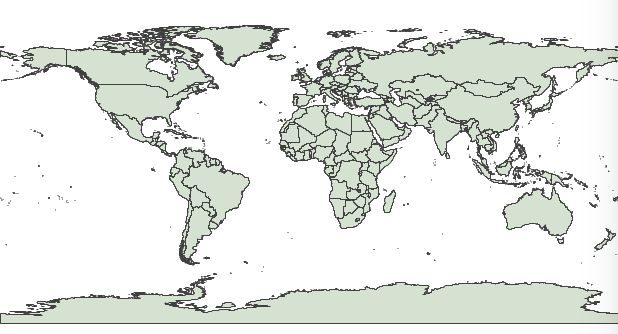
000_legends_01Let’s look at some of these possibilities. We worked with a polygon layer to represent world administrative divisions.

By default, every element of the same layer has the same simbology “Unique Symbol” in gvSIG.

000_countries01You can easily change simbology by clicking on Simbology Properties Editor and then select layer. Population attribute, available in this layer, will be used to show various ways to represent a numeric attribute and showing different types of visual results.

Intervals” is perhaps the most common legend type to represent numerical data since this legend classify available values for each field in ranges of values. From population field we generate an interval legend as follows:

002_legendsInterval legend generates a map where it is possible to differentiate the world’s most Populated countries:

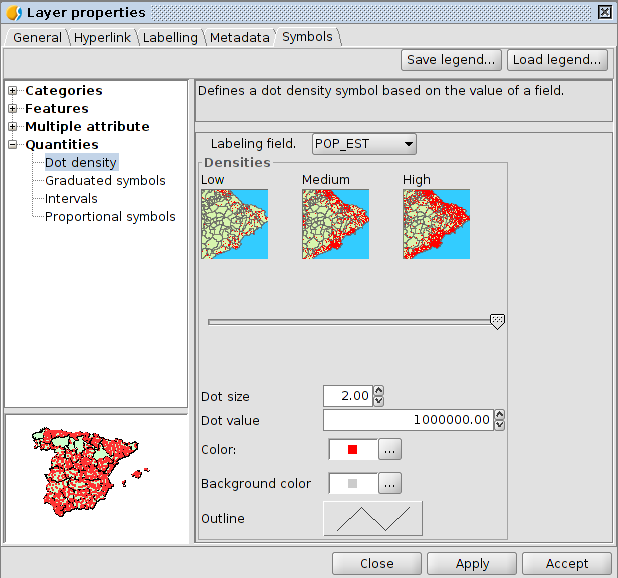
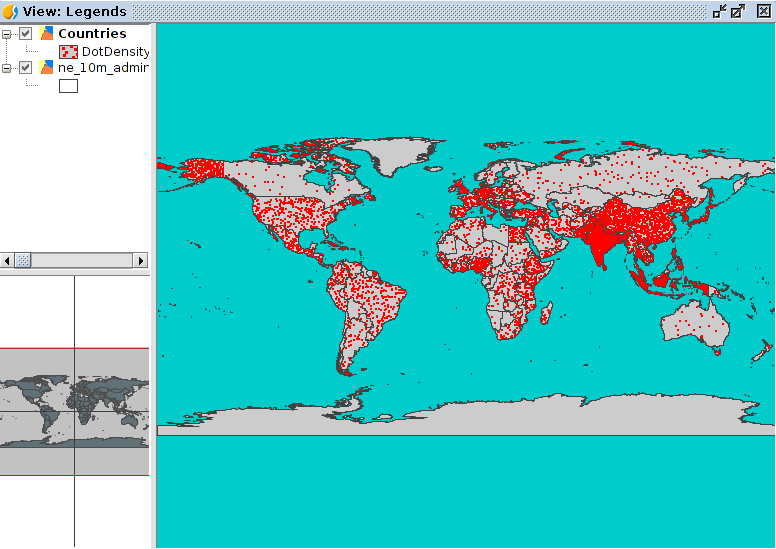
004_legendsLet’s take a look now how it changes our perception of reality as a result of the legend we use. Another example of legend would be “Dot density”. We’ll define a symbol point and a value for that point. In our case, each point will have a value of one million inhabitants. gvSIG will take the attribute value of population for each element and a point is drawn in a random way over the whole surface for each million inhabitants.

005_legendsThe resulting image will give us different outcome from the previous legend. In this case, we are studying how to represent population density. We just need to look at countries such as Russia, Brazil, India and China to appreciate the differences between both legends.

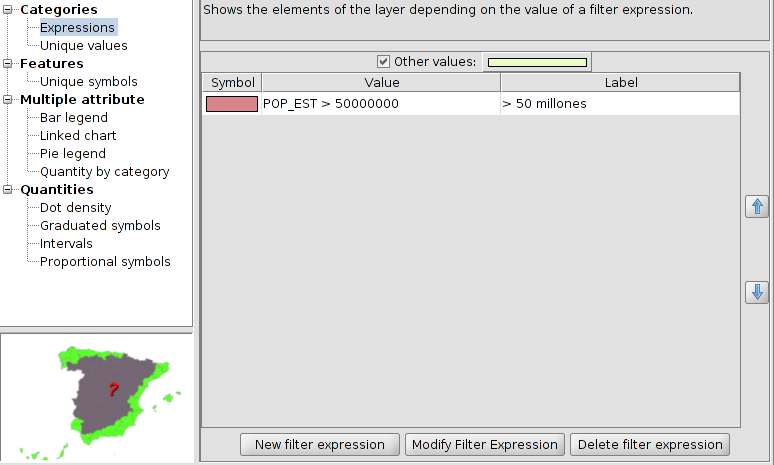
007_legendsAlthough graduate and proportional symbol legends also give us interesting information, the aim of this text is not to do a thorough overview of all legends. And so we now move on from legends of “Quantities” to legends of “Categories”. We have in this group one of the most common and basic types of legends: “Unique value legend”, which assigns a symbol for each unique value of the indicated attribute table. In our case, we will see using a simple example how “Expressions” legend works. A type of symbol is assigned to the elements which meet certain condition or expression. And of course, it is possible to have in the same legend as many conditions as we want.

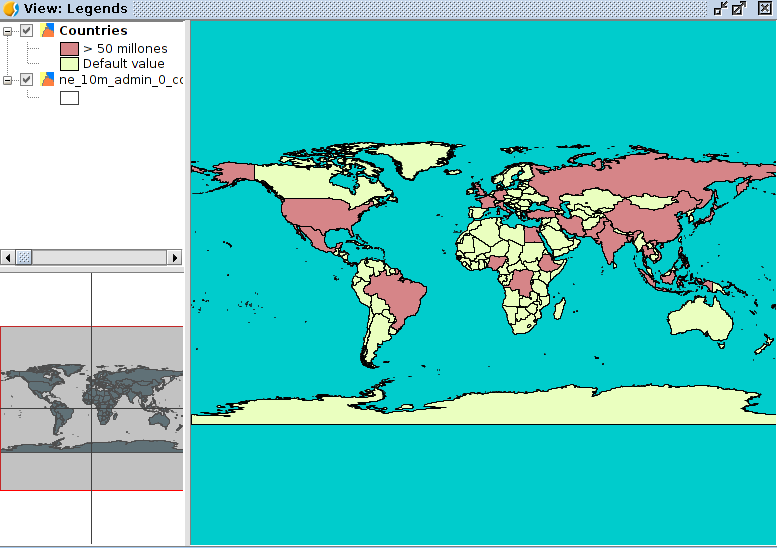
If we select this legend and click “New filter expression”, we shall see a window where we can build our expressions. In order to see how useful is this legend, we will see an example as easy as represent in the same colour all countries over 50 million inhabitants.

008_legendsWe will select another one for all the rest of items which do not satisfy the condition:

009_legendsThe end result will be an image like this:

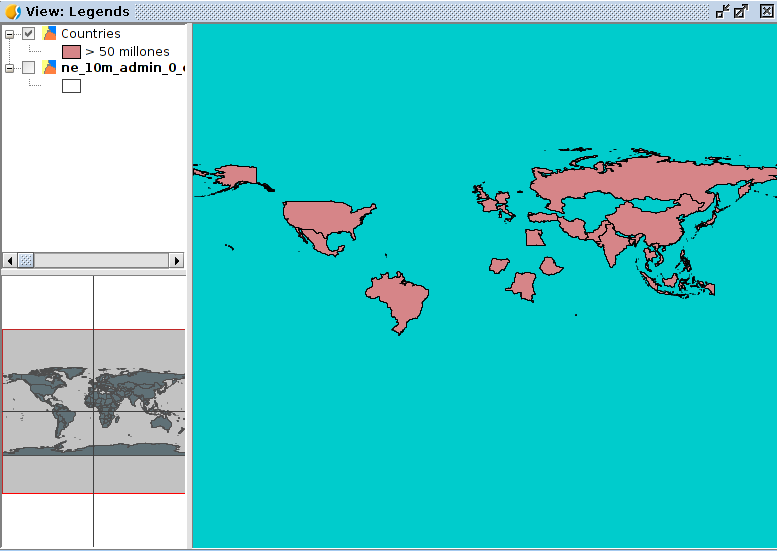
010_legendsIf we are just interested in representing elements which satisfy the condition, it would be as simple as clearing the check box “ Rest of values”. We would have a map like this:

011_legendsAlso, we have “Multiple attributes” legend where we can find bars and pies legend. If we use bars legend and click on zoom on the centre of Africa we would have an image like this, where population is represented with a bar graph:

000_legend_barchartAs you can see, there is a wide range of possibilities to represent the same data in very different ways. We have reviewed in tis post some types of legends included in gvSIG 2.1 and we could say that this new gvSIG version is very complete in respect of simbology area.

Posted in english, gvSIG Desktop | Tagged , , | 1 Comment

gvSIG 2.1: Dragging layers from the file browser

In gvSIG 2.1 we find another little improvement, but with a lot of advantages for users. It’s the option to drag layers from the file browser to our View in gvSIG, and the layer is included automatically.

At this video we can see this improvement:

Posted in english, gvSIG Desktop | Tagged | 1 Comment

gvSIG 2.1: extensión de Discromatopsia / Daltonismo

En gvSIG 2.1 hemos incluido una extensión que puede parecer curiosa a un alto porcentaje de usuarios pero que no por ello deja de ser muy interesante para aquellos usuarios que tienen problemas en la percepción de los colores.

De hecho encontramos que esta funcionalidad se considera imprescindible en algunos ámbitos, como refleja el libro blanco de software SIG del IACA (International Association of Crime Analysts) que incluye como factor de evaluación que “el sistema esté preparado para los problemas comunes de ceguera para los colores”.

La funcionalidad de este complemento es muy simple, a partir de una Vista con una leyenda predeterminada podemos transformar esa leyenda (o crear una nueva) en otra que sea interpretable por los usuarios que tengan algún problema relacionado con la discromatopsia o el daltonismo.

Como siempre esta extensión se puede instalar mediante el “administrador de complementos” de gvSIG. En la imagen podéis ver el nombre del complemento:

dyschromatopsia

Os dejamos con un vídeo que ilustra su funcionamiento:

Posted in gvSIG Desktop, spanish | Tagged , , | 1 Comment

gvSIG 2.1: biblioteca de símbolos de puntos de interés urbanos

Como comentábamos en un anterior post, para gvSIG 2.1 se han incluido un conjunto de nuevas bibliotecas de símbolos. Estas bibliotecas además van incluidas entre los paquetes de la instalación básica (aunque no instaladas por defecto). ¿Esto que quiere decir? Que podemos instalarlas en cualquier momento sin tan siquiera necesitar una conexión a internet.

Una de estas bibliotecas, denominada POI Cities, agrupa un conjunto de símbolos que representan los principales puntos de interés de una ciudad: parques, aeropuertos, estaciones de metro, distintos tipos de comercios, museos, monumentos, etc.

Está basada en la simbología que utiliza el proyecto Mapbox y, en concreto, en la librería denominada Maki.

Mostramos en un vídeo como realizar la instalación y visualizamos el aspecto de esta nueva biblioteca. A partir de ahora vuestros mapas urbanos serán mucho más elegantes.

Posted in gvSIG Desktop, spanish | 1 Comment

gvSIG 2.1: Biblioteca de símbolos de Geología

En gvSIG 2.1 el usuario encontrará un conjunto de nuevas bibliotecas de símbolos que completan todavía más el amplio catálogo de símbolos existente.

Una de estas nuevas bibliotecas de símbolos es la referente a Geología.

Esta biblioteca contempla principalmente 2 conjuntos de símbolos. Por un lado se ha realizado el trabajo de generar los símbolos vectoriales adaptados a gvSIG en base al manual del “Digital Cartographic Standard for Geologic Map Symbolization “ del FGDC (Federal Geographic Data Committee)…cientos de símbolos estructurados en un conjunto de carpetas y subcarpetas (bedding, cleavage, eolian, fluvial/alluvial, foliation, geohydrology…).

Por otro lado se han diseñado un conjunto de símbolos de relleno con los códigos de color RGB definidos por la CGMW (Commission for the Geological Map of the World) y que representan las distintas unidades estratigráficas

El modo de instalación es el habitual, a través del administrador de complementos…tal y como vemos en el siguiente vídeo.

Posted in gvSIG Desktop, spanish | Tagged , , | 1 Comment

gvSIG 2.1: Editor alfanumérico en Vista

Una novedad que se ha introducido en los últimos build de gvSIG 2.1, gracias al aporte de la empresa brasileña GAUSS geotecnologia e engenharia, es un sencilla pero útil herramienta: un editor alfanumérico que permita editar los atributos de cualquier elemento de una capa sin necesidad de tener que ir a su tabla.
La forma de funcionamiento es muy similar a la del botón de “Información”, pero en este caso nos permite editar cualquiera de los atributos del elemento seleccionado. De este modo se agilizan considerablemente las tareas de edición de los usuarios de gvSIG.

Veamos mediante un vídeo el funcionamiento de esta herramienta:


Posted in gvSIG Desktop, opinion, spanish | Tagged , | 2 Comments

gvSIG 2.1: Memory management

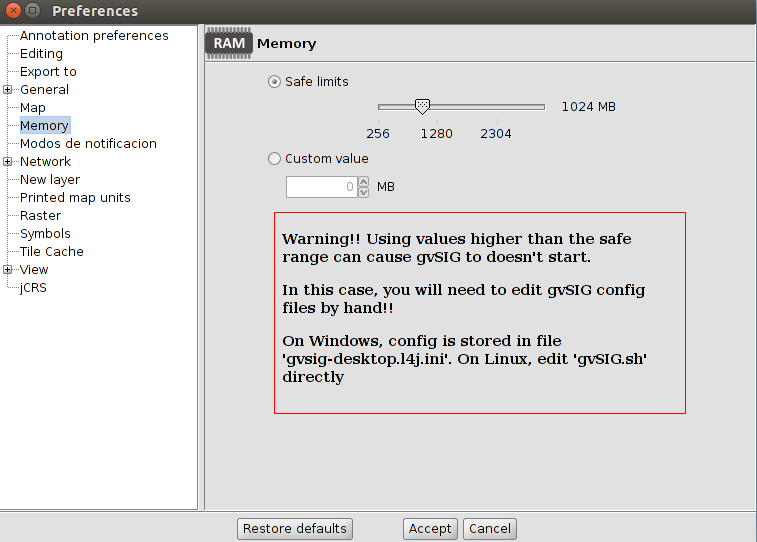
Users that start to use gvSIG will find a lot of small improvements respecting previous versions. Now we’re going to tell about one of them, the possibility to manage the RAM memory used by gvSIG.

Until this version, the user had to do it manually, editing a text file and modifying the memory parameters. In gvSIG 2.1 an option has been included in order to manage the memory from the application preferences.

00_memory


Posted in development, english, gvSIG Desktop | 1 Comment

gvSIG 2.1: Configuration of the grid in the new Layout

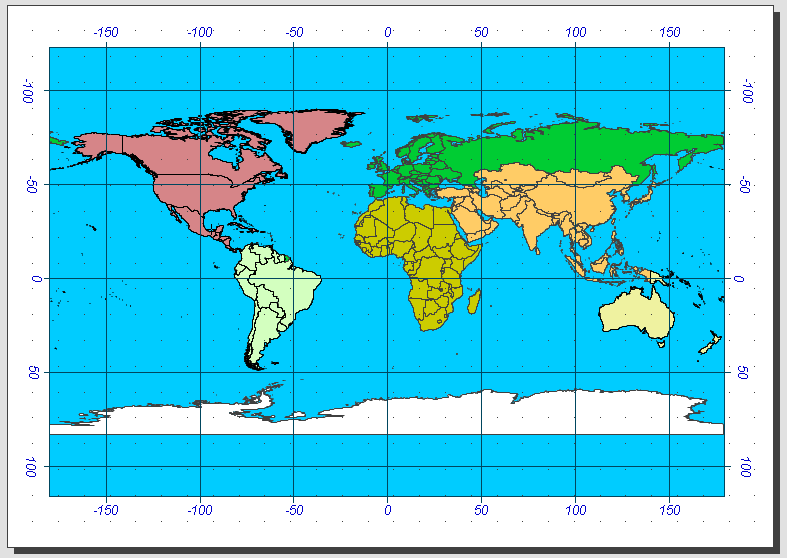
Following the changes in the cartographic production, the new Layout presents in gvSIG 2.1. The grid generating function is greatly improved. Now we will be able to configure almost all visual parameters and thus we can cover many of the needs that gvSIG community users had demanded.

We will see, with a very easy example, the new functionality of grid configuration.

We start from a simple Layout where we will add a grid:

00_grid0If you were surprised to see the Table of Contents embedded in the document Layout, it is because you have not read last week´s post.

The first thing we do is select the View that is inserted on our Layout and display its context menu -clicking on it with the right-button. Among the options that it shows us, we select “Properties”. gvSIG will show a window and this one will be similar to the following image, where we can configure all the parameters related to a View:

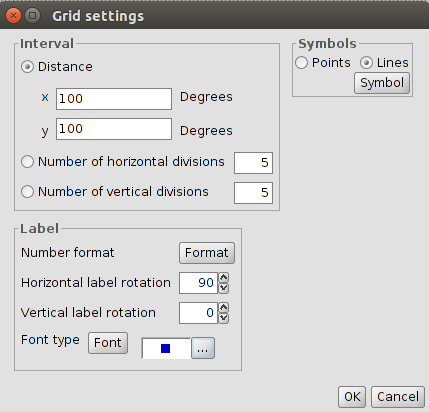
00_grid1In this case we are interested in grid configuration. It is located at the bottom of the window. We enter in settings; we have to press the corresponding button. This will open a new window where you can configure every parameter of the grid:

00_grid2In our case, we will select that the grid will be symbolized by lines 100 degrees for both horizontal and vertical intervals. Also we will indicate the horizontal labels are rotated 90 ° (the rotation of this feature was one of the most requested by users). We configure the remaining parameters (font, size, color …) and we have our grid ready. Simple, really?

00_grid3

Posted in english, gvSIG Desktop | Tagged , , , | Comments Off on gvSIG 2.1: Configuration of the grid in the new Layout