ETL en gvSIG Online, pasar datos fácilmente a la IDE

En gvSIG Online se ha desarrollado un plugin ETL (Extract, Transform and Load) que permite definir un proceso de transformación para pasar datos como archivos CSV y hojas de cálculo Excel a capas disponibles en la Infraestructura de Datos Espaciales. De este modo gvSIG Online cuenta con herramientas que permiten a la organización que lo tiene implantado el reformatear y limpiar los datos de origen y cargarlos en la base de datos espacial de la IDE. Continue reading

Posted in geoportal, gvSIG Online, IDE, software libre, spanish | Tagged , , | Leave a comment

Grabación del webinar “Aplicaciones de SIG Móvil con Geopaparazzi/gvSIG Mobile​”

Ya está disponible la grabación del webinar “Aplicaciones de SIG Móvil con Geopaparazzi/gvSIG Mobile​” organizado por la Asociación gvSIG y GeoAlternativa dentro del marco de la iniciativa Geo for All de OSGeo, grupo Iberoamérica.

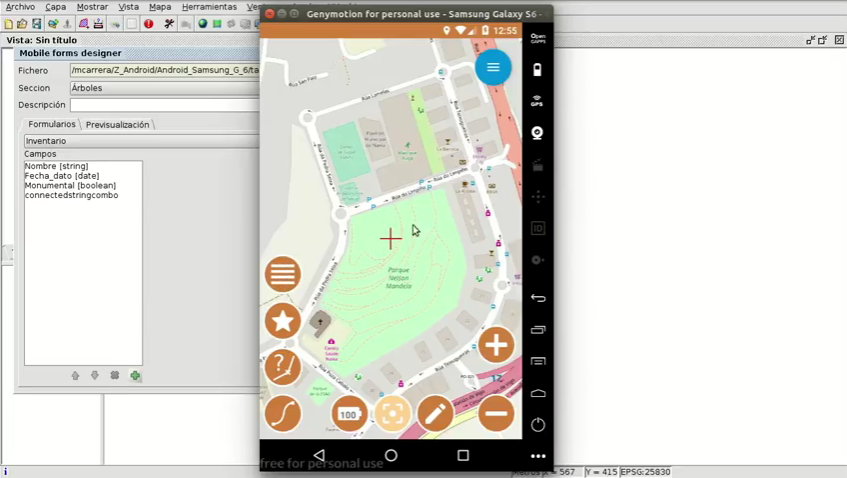
Si no has podido seguirlo en directo ahora puedes ver esta presentación, en la que se ha mostrado en qué consiste la herramienta Geopaparazzi/gvSIG Mobile, y cómo utilizarla. Una de las novedades mostradas es la funcionalidad que permite generar formularios personalizados para la toma de datos en campo, una de las formas de integración de gvSIG Mobile con gvSIG Desktop.

Para saber más de Geo for All: https://www.youtube.com/watch?v=Hu_6ACu1udI

Y el vídeo del webinar:


Posted in Geopaparazzi, gvSIG Mobile, spanish | Leave a comment

Suite gvSIG: Ponencias y Taller en Jornadas de SIG Libre de Girona

Desde hace unos días está disponible el programa de las Jornadas de SIG Libre de Girona. Los asistentes al evento tendrán la oportunidad de conocer todas las novedades de la Suite gvSIG gracias a las tres ponencias que tendrán lugar el día 7 de junio:

Además, para aquellos interesados en conocer más a fondo el funcionamiento de gvSIG Online, tendrá lugar un taller el 8 de junio. El instructor del mismo será Nacho Muñoz Montilla, responsable de la Infraestructura de Datos Espaciales de La Pobla de Vallbona, todo un ejemplo de IDE en software libre.

Más información: http://www.sigte.udg.edu/jornadassiglibre/

Y no está de más recordar que Girona es uno de los escenarios donde se grabó Juego de Tronos. Y eso nos lleva a otra forma (diferente) de aprender SIG.

Posted in events, Geopaparazzi, geoportal, gvSIG Desktop, gvSIG Mobile, gvSIG Online, IDE, software libre, spanish | Tagged , , , | Leave a comment

Layers with multiple legends on a Geoportal with gvSIG Online

We are going to show you more gvSIG Online tools, the platform for Spatial Data Infrastructures that doesn’t stop growing. In this case we are going to talk about the tool for multiple legends, a really useful functionality when we want to show a same layer with different legends in a Geoportal. Surely more than once you have found that problem… that gvSIG Online solves easily.

The steps to be followed for this are shown in the video:

  1. From the dashboard, several legends are created for the same layer: one for a single symbol, another for unique values and another for grouping points.
  2. In a geoportal created with gvSIG Online, from the table of contents we can see how we can select the different legends available in the layer and it is automatically applied.

Easy and extremely useful, right?

Posted in english, geoportal, gvSIG Online, SDI | Tagged , | 1 Comment

Capas con múltiples leyendas en un Geoportal con gvSIG Online

Os seguimos mostrando herramientas de gvSIG Online, la plataforma para Infraestructuras de Datos Espaciales que no para de crecer. En este caso vamos a hablar de la herramienta de leyendas múltiples, una funcionalidad realmente útil cuando queremos mostrar una misma capa con diferentes leyendas dentro de un Geoportal. Seguro que más de una vez os habéis encontrado con ese problema…que gvSIG Online resuelve fácilmente.

Los pasos seguidos para ello se muestran en el vídeo:

  1. Desde el área de administración se crean varias leyendas para una misma capa: una de símbolo único, otra de valores únicos y otra de agrupación de puntos.
  2. En un geoportal creado con gvSIG Online, desde la tabla de contenidos vemos como podemos seleccionar las distintas leyendas disponibles en la capa y automáticamente es aplicada.

¿Fácil y extremadamente útil, verdad?

Posted in geoportal, gvSIG Online, IDE, software libre, spanish | Tagged , | 3 Comments

Raster time series in an SDI: Temporal image mosaics in gvSIG Online

If a few days ago we presented the abilities of working in gvSIG Online with vector data in 4D, today we show you how you can also work with temporary series of images.

Continue reading

Posted in english, geoportal, gvSIG Online, SDI | Tagged , | 1 Comment

Series temporales Ráster en una IDE: Mosaicos de imágenes temporales en gvSIG Online

Si hace unos días os presentábamos las capacidades de trabajar en gvSIG Online con datos vectoriales en 4D, hoy os mostramos cómo también puede trabajar con series temporales de imágenes. Continue reading

Posted in geoportal, gvSIG Online, IDE, software libre, spanish | Tagged , , , , | Leave a comment

Managing pan and zoom at digitalization in gvSIG Desktop

Some users have asked about an issue when they are editing a vector layer with lines or polygons in gvSIG Desktop, and they need to continue digitalizing the geometry out of the field of vision of the screen, where currently they can’t change between the zoom tools and the geometry digitalyzing tool directly.

To solve the problem we have two options: The first option, perhaps the most comfortable, would be to click on the mouse wheel while we are digitalyzing and then move the mouse where we want, so we will move the view without leaving the digitalyzing . The second option is to roll the mouse wheel, zooming in and out so that we will move to other areas of the view.

Continue reading

Posted in english, gvSIG Desktop, training | Tagged | 1 Comment

Gestión de zoom y desplazamiento durante la digitalización en gvSIG Desktop

Algunos usuarios han preguntado sobre algún problema cuando están editando una capa vectorial de líneas o polígonos en gvSIG Desktop, y necesitan continuar digitalizando la geometría fuera del campo de visión de la pantalla, donde actualmente no se puede cambiar entre la herramienta de zoom desplazamiento y la de crear la geometría directamente.

Para solucionar dicho problema tendríamos dos opciones: La primera opción, quizás la más cómoda, sería la de pinchar sobre la rueda del ratón mientras estamos digitalizando y mover el propio ratón hacia donde deseemos, de forma que desplazaremos la Vista sin dejar la herramienta de digitalizar. La segunda opción sería la de mover la rueda del ratón, alejándonos y acercándonos de forma que nos vayamos desplazando a otras zonas de la Vista.

Continue reading

Posted in gvSIG Desktop, spanish, training | Tagged | Leave a comment

New Plugin available to capture coordinates

New plugin available for gvSIG Desktop 2.4 from the Add-ons Manager. It allows to capture the coordinates of a point indicated by the user, both in the view reference system … and in any other.

It also allows us to copy the point coordinates to the ‘Clipboard‘, and then paste them into other applications.

This plugin, for those who are curious about the inactive tab that appears in gvSIG, is ready for the next version of gvSIG Desktop, where it will have more functionalities… but we’ll talk about that when the time comes.

Here you have a short video that shows the installation and use of the new plugin.


Posted in gvSIG Desktop | 6 Comments