Towards gvSIG 2.5: Quick Drawing

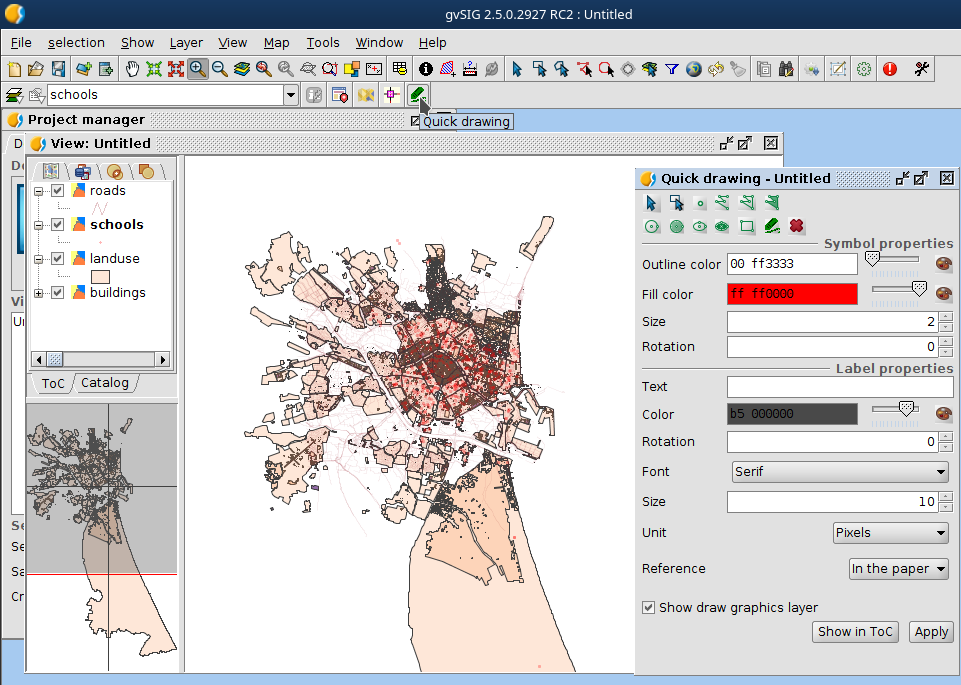
Sometimes we need a tool that will allow to take quick notes over the map. The objective of this notes can be explicatory of certain characteristics of the map, reminders of certain work that we need to do, etc.

For that purpose we have created Quick Drawing Tool.

Continue reading

Posted in gvSIG Desktop | 2 Comments

Camino a gvSIG 2.5: Herramienta de Dibujo rápido

En ciertos casos viene muy bien tener una opción para realizar anotaciones rápidas sobre las Vistas que tenemos preparadas en gvSIG para destacar ciertas características del mismo, ya sea con el objetivo de resaltarlas con un objetivo explicativo o como un recordatorio para nosotros mismos sobre acciones que tengamos que tomar.

Para ello se ha creado la herramienta de Dibujo rápido que podréis encontrar en la barra de tareas.

Continue reading

Posted in gvSIG Desktop, spanish | Tagged , , , | 1 Comment

Towards gvSIG 2.5: Saving export parameters and new functionalities

In the new gvSIG Desktop 2.5 we will have the option to save the export parameters of our exportations.

For certain types of projects we’ll usually make the same exportations: certain layer export to one folder, with certain name, certain projection, certain fields, etc. With this new functionality you’ll be able to save this parameters.

Two new functionalities:

  • History: save all the exportations that we made
  • Bookmarks: save the exportations that we want.

History

To use the historic panel you just have to export one layer, gvSIG will save this exportation and when you enter again to the export panel it will appear on the button on the top right of the panel.

The old exportations will appear actives if that parameters can be use in the selected exportation format. If we press one, when we navigate through the wizard panels they will be load with the selected parameters.

Continue reading

Posted in english, gvSIG Desktop | Tagged | 2 Comments

Camino a gvSIG 2.5: Guardado de parámetros de exportación y otras mejoras

Una de las funcionalidades que se han añadido a la nueva version de gvSIG Desktop 2.5 es la posibilidad de guardar los parámetros de exportación de las exportaciones que solamos hacer.

Para cierto tipos de proyectos solemos hacer siempre las mismas exportaciones: que cierta capa se exporte a una carpeta concreta con un nombre especificado, con cierta proyección, ciertos campos, etc. Con esta funcionalidad nos permitirá facilitar estas exportaciones. Podrás dejar preparadas las que más a menudo suelas utilizar y luego cargarlas desde el exportador.

Tendremos acceso a dos nuevas funcionalidades:

  • Histórico: almacena los parámetros de las últimas exportaciones realizadas automáticamente
  • Marcadores o favoritos: almacena con un nombre especifico los parámetros de exportación que hayamos utilizado.

Histórico

Para el histórico solo tendrás que realizar una exportación normal. Al volver a la ventana del exportador, arriba a la derecha aparecerá el icono de Histórico. Al pinchar veremos lo siguiente:

Aparecerá un listado de antiguas exportaciones, apareciendo visibles las compatibles con el servicio de exportación que tengamos seleccionado. Si presionamos sobre la que queremos, cuando recorramos los siguientes paneles de exportación veremos que ya están rellenos con los parámetros del histórico. 

Continue reading

Posted in gvSIG Desktop | 1 Comment

Towards gvSIG 2.5: Taxonomy symbol library

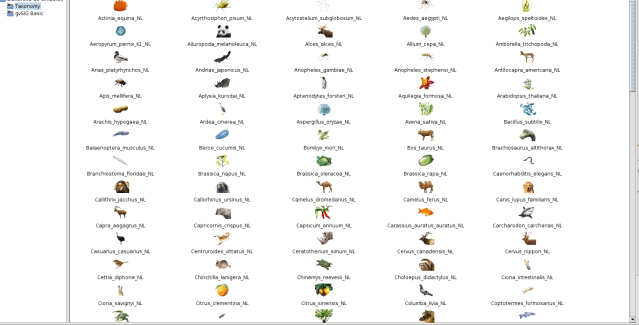
In biology, taxonomy is the science of naming, defining (circumscribing) and classifying groups of biological organisms on the basis of shared characteristics.. The new symbol library includes more than 200 icons of species.

This new symbol library, available for gvSIG Desktop from the Add-on manager, is based on the collection of icons of the Japanese Database Center for Life Science.

Posted in gvSIG Desktop, spanish | Tagged , , , , , | 2 Comments

Camino a gvSIG 2.5: Biblioteca de símbolos de Taxonomía

La taxonomía biológica es la «teoría y práctica de clasificar organismos». La nueva biblioteca de símbolos contiene más de 200 iconos de especies biológicas.

Esta nueva biblioteca de símbolos, disponible para gvSIG Desktop desde el “Administrador de Complementos”, está basada en la colección de iconos creada por el “Database Center for Life Science” de Japón.

Posted in gvSIG Desktop, spanish | Tagged , , , | 1 Comment

GSoC Project 2019: New rules for the Topology Framework (1)

Scripting: Automate tasks and Ensure Information Quality instead of spending our time doing what a machine.

If the repetitive tasks do not need special perception, creative intelligence or social intelligence then are feasible tasks of automation and not appropriate to creative beings with a critical reflexive attitude.

The Project “New rules for the Topology Framework in gvSIG Desktop” was carried out within the Google Summer of Code 2019 program with OSGeo (Open Source Geospatial Foundation) and the gvSIG Association, this is an example of how scripting can help to automate tasks and save time, allowing the user to focus on the logic to solve.

With the automation of topological rules errors are prevented, especially when working with large volumes of information, since it is very feasible to have errors of both precision and accuracy. For example: overlays, positional accuracy, mismatched geometries and inconsistent data.

Continue reading

Posted in gvSIG Desktop | 3 Comments

Proyecto GSoC 2019: Nuevas reglas para el Marco de Topología (1)

Scripting: Automatizar tareas y Asegurar la Calidad de la Información en lugar de pasar nuestro tiempo haciendo lo que una máquina.

Si las tareas rutinarias no necesitan especial percepción, inteligencia creativa o inteligencia social entonces son tareas factibles de automatización y no propias de seres creativos y con actitud crítica reflexiva.

El proyecto “Nuevas reglas para el Marco de Topología en gvSIG Desktop” se realizó dentro del programa de Google Summer of Code 2019 con la organización OSGeo (Open Source Geospatial Foundation) y la Asociación gvSIG, este es un ejemplo de como el scripting puede ayudar a automatizar tareas y ahorrar tiempo, permitiendo que el usuario se centre en la lógica a resolver.

Con la automatización de reglas topológicas se previenen errores, sobre todo al trabajar con grandes volúmenes de información, ya que, es muy factible tener errores tanto de precisión como de exactitud. Por ejemplo: superposiciones, precisión posicional, geometrías no coincidentes y datos inconsistentes.

Las reglas de topología aseguran que los conjuntos de datos cumplen con las condiciones especificadas en cada regla. Lograr implementar esto es un proceso imprescindible para asegurar la integridad y calidad de los datos espaciales.

Continue reading

Posted in gvSIG Desktop | Tagged , , | 2 Comments

Taller sobre Análisis de datos con gvSIG Desktop en las 15as Jornadas Internacionales gvSIG

El próximo 6 de noviembre de 2019, dentro de las 15as Jornadas Internacionales gvSIG que se celebrarán en Valencia (España), se impartirá un taller gratuito sobre Análisis de datos con gvSIG Desktop.

Durante el taller se verá cómo analizar tanto datos ráster como vectoriales, a través de diferentes geoprocesos, aplicación de distintas simbologías…

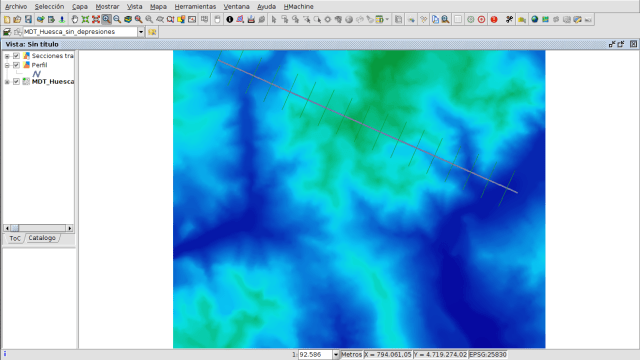
En la primera parte del taller se analizarán datos vectoriales para obtener la situación óptima o la carencia de ciertos elementos urbanos (aparcamientos de bicicletas, contenedores…), y en la segunda parte se realizarán distintos análisis sobre Modelos Digitales de Terreno, aprendiendo incluso a crearlos previamente a partir de una capa vectorial con un campo con cotas.

Para este taller concretamente ya se ha completado el aforo, pero tenéis otros talleres gratuitos en los que aún quedan plazas en la web de las jornadas.

Podéis consultar el programa completo de las jornadas aquí:

http://www.gvsig.com/es/eventos/jornadas-gvsig/15as-jornadas-gvsig/programa

La inscripción a las jornadas se realiza desde el siguiente formulario:

http://www.gvsig.com/es/eventos/jornadas-gvsig/15as-jornadas-gvsig/inscripcion

La inscripción a los talleres se puede realizar desde el siguiente apartado:

http://www.gvsig.com/es/eventos/jornadas-gvsig/15as-jornadas-gvsig/inscripcion-talleres

Posted in events, gvSIG Desktop, spanish, training | Leave a comment

gvSIG Desktop: Scary symbols library for Halloween

Focused in spooky gvSIG users, we have generated a new symbol library for Halloween.

Click here to Dowload

The installation way is the usual, from add-ons manager

Posted in english, gvSIG Desktop | Tagged , | Leave a comment