GIS applied to Municipality Management: Module 12 ‘Geoprocessing’

The video of the twelfth module is now available, in which we will see the geoprocessing tools in gvSIG.

gvSIG has more than 350 geoprocesses, both for raster and vector layers, which allow us to perform different types of analysis, for example to obtain the optimal areas to locate a specific type of infrastructure.

Continue reading

Posted in english, gvSIG Desktop, training | Tagged , , | 9 Comments

Asociación gvSIG participará en el ILoveFS 2018

ilovefs-banner-extralarge

Por tercer año consecutivo Datalab organiza en MediaLab Prado el IloveFS18, un espacio de demostración de cariño y amor al Software Libre, como no, el 13 y el 14 de febrero.

La Asociación gvSIG estará presente mostrando que el SIG libre puede utilizarse para casi cualquier ámbito de nuestra vida. Facilitaremos un taller de gvSIG básico aplicado a la labor periodística para que todo el mundo pueda aprender Geomática Libre de manera práctica y divertida.

La cita será de 18:45 a 20:30 el martes 13 y de 18:45 a 20:00 el miércoles 14 en las instalaciones de MediaLab Prado.

Por supuesto, el evento y los talleres son completamente gratuitos y sólo necesitáis registraros en la web habilitada para ello.

Podéis ver la información completa en http://medialab-prado.es/article/ilovefs18

Y podéis descargar la versión portable para vuestro sistema operativo en http://www.gvsig.com/es/productos/gvsig-desktop/descargas


Posted in gvSIG Desktop | Leave a comment

GIS applied to Municipality Management: Module 11 ‘Reprojecting vector layers’

The video of the eleventh module is now available, in which we will show how to reproject vector layers.

Sometimes municipalities need external geographic information to work, for example cartography published by another administration, such as regional or national. That cartography can be in a different system than technicians usually work on in the municipality. If we don’t take the reference systems into account, both cartographies would not be overlapped correctly.

The municipality technicians can also use old cartography, which is in an obsolete reference system, and they need to have it in an updated reference system. For this, it will be necessary to reproject that cartography.

Continue reading

Posted in english, gvSIG Desktop, training | Tagged , , , , , | 10 Comments

GIS applied to Municipality Management: Module 10 ‘How to convert cartography from CAD to GIS’

The video of the tenth module is now available, in which we will show how to load and manage cartography in CAD format on gvSIG.

Many municipalities have their geographic information in CAD format, and in many cases there’s an only file for the whole municipality that contains all type of information, such as power lines, parcels, drinking water system, sewage system…, each one in a different layer.

It sometimes makes it difficult to manage, even we have to divide the municipality into sheets to manage that information, where we lose information of our municipality as a group. In that case, to make queries, calculations…, we would have to open the different files.

Continue reading

Posted in CAD, english, gvSIG Desktop, training | Tagged , , , | 19 Comments

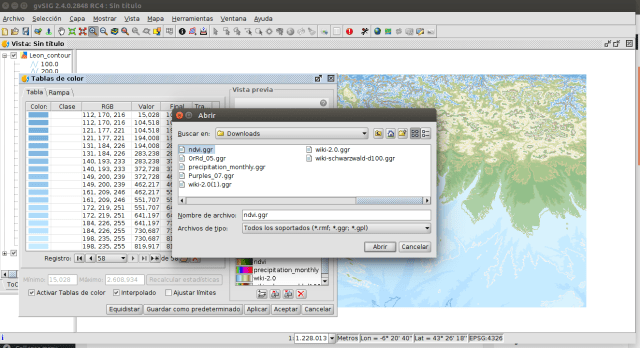
Adding new colour tables in gvSIG Desktop, more options to represent our data

The colour tables are used in gvSIG Desktop to represent both raster data (for example, a Digital Elevation Model) and vector data (they can be applied in legends such as unique values or heat maps). By default gvSIG Desktop has a small catalog of colour tables. But most of the users don’t know that it’s very easy to add new colour tables. Do you want to see how easy it is? Continue reading

Posted in english, gvSIG Desktop | Tagged | 1 Comment

Webinar on “gvSIG Suite: open source software for geographic information management in agriculture – Technology and case studies” (February 15)

GODAN and gvSIG Association invite you to join the webinar about “gvSIG Suite: open source software for geographic information management in agriculture – Technology and case studies“, in February 15th at 2PM GMT.

This webinar will deal with the gvSIG Suite, the whole catalog of open source software solutions offered by the gvSIG Association, and case studies about forestry and agriculture of the different products.

With free registration, this event is appropriate for all users interested in knowing how to work with an open source Geographic Information System in agriculture and forestry sectors.

Continue reading

Posted in community, english, events | Tagged , , , , | 4 Comments

Añadir nuevas tablas de color a gvSIG Desktop, ampliando las opciones para representar nuestros datos

Las tablas de color se utilizan en gvSIG Desktop tanto para representar datos ráster (por ejemplo, un Modelo Digital del Terreno) como para representar datos vectoriales (se pueden aplicar en leyendas como la de valores únicos o en la de mapas de calor). Por defecto gvSIG Desktop tiene un pequeño catálogo de tablas de color. Lo que la mayor parte de usuarios no sabe es que es muy sencillo añadir tablas de color nuevas. ¿Queréis ver lo fácil que es? Continue reading

Posted in gvSIG Desktop, spanish | Tagged , | 1 Comment

Sentilo and gvSIG: Agreement to collaborate

We are pleased to announce that Sentilo and gvSIG communities have reached an agreement to collaborate closely in order to make it easier for users, partners and developers of both communities to deploy an integrated sensor platform and a Geographic Information System, both based on open source. Continue reading

Posted in english, gvSIG Desktop, gvSIG Online, gvSIG Suite, technical collaborations | Tagged , , , , | 1 Comment

Cambiando el ‘look and feel’ de gvSIG Desktop en un par de pasos

En alguna ocasión me han preguntado por cómo poder cambiar la apariencia que viene ‘de serie’ de gvSIG Desktop. La verdad es que siempre ha habido algunas opciones, aunque desconocidas para la mayoría de los usuarios. Con la versión 2.4 de gvSIG Desktop se amplían al poder crear y utilizar nuevos juegos de iconos.

Os voy a poner un pequeño ejemplo para en un par de pasos cambiar ‘el estilo’ por defecto de gvSIG Desktop 2.4. Continue reading

Posted in gvSIG Desktop, spanish | Tagged , , | 1 Comment

GIS applied to Municipality Management: Module 9 ‘Hyperlink’

The video of the ninth module is now available, in which we will show how to work with hyperlinks in gvSIG.

This tool allows us to associate images, text files, pdf files, folders, web pages … to the geometries of our vector layer. For that we must have one or more fields in the attribute table of that shapefile in which we will have the file or folder paths or the web page URL.

When we create the field for the paths it’s important to indicate a large size (for example 200 characters), since if we link to a very long path and the field length is smaller, that path will be cut and you will not find the linked element.

This functionality will be very useful to show reviews, pictures, reports … of our geographical entities.

Continue reading

Posted in gvSIG Desktop | 12 Comments