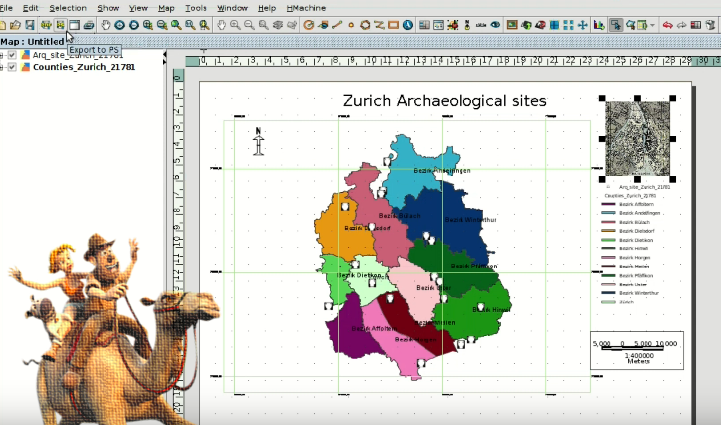
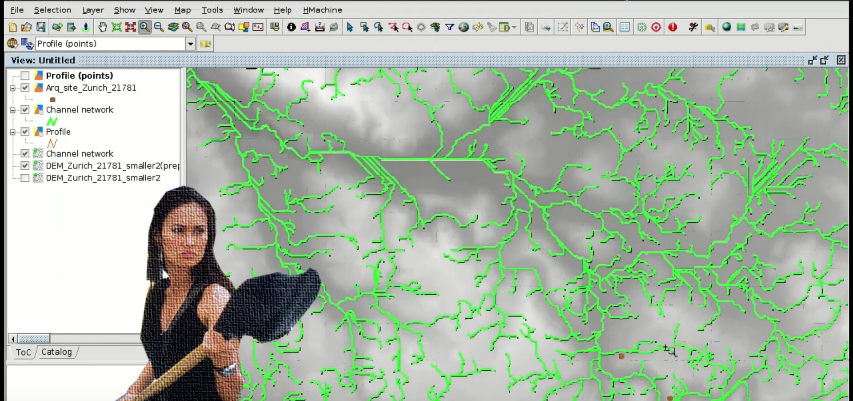
Territorial analysis of archaeological sites: Raster geoprocessing and Digital Elevation Models. GIS applied to Archeology

We are now reaching the end of the course about GIS applied to Archaeology. At this module you will learn to apply raster geoprocesses and use Digital Elevation Models to perform the territorial analysis of archaeological sites.

If you haven’t done the previous exercises, we recommend you to start with the first module.

Continue reading

Posted in english, gvSIG Desktop, training | Tagged , , , , , , | 8 Comments

Análisis territorial de yacimientos: Geoprocesos ráster y Modelos Digitales de Terreno. SIG aplicados a Arqueología

Entramos ya en la recta final del curso de SIG aplicados a Arqueología. En el módulo de hoy aprenderemos a aplicar geoprocesos ráster y a utilizar Modelos Digitales del Terreno para realizar el análisis territorial de yacimientos.

Si aún no has realizado los ejercicios anteriores, te recomendamos que empieces por el primer módulo.

Continue reading

Posted in gvSIG Desktop, spanish, training | Tagged , , , , , , , | 3 Comments

Working with historical maps: Georeferencing images. GIS applied to archaeology

A new module of the free course about GIS for archaeologists is now available, and we are now halfway through the course. At this module we will see how we can use Geographic Information Systems to georeference historical maps, so we can use them for our projects and cross them with current cartography.

During the exercise, we will proceed to georeference a scanned image with historical information of a city using reference cartography. Continue reading

Posted in english, gvSIG Desktop, training | Tagged , , , , , | 6 Comments

Trabajando con mapas antiguos: Georreferenciación de imágenes. SIG aplicados a Arqueología

Os traemos un nuevo módulo con el que llegamos al ecuador del curso gratuito de SIG aplicados a Arqueología. En este tema veremos como podemos utilizar los Sistemas de Información Geográfica para georreferenciar mapas antiguos, pudiendo así utilizarlos para nuestros proyectos y cruzarlos con cartografía actual.

Durante el ejercicio, a partir de una imagen escaneada con información histórica de una ciudad, procederemos a georreferenciarla utilizando cartografía de referencia. Continue reading

Posted in gvSIG Desktop, software libre, spanish | Tagged , , , , , , | 5 Comments

Analysis of prospection results: Vector geoprocessing. GIS applied to Archaeology

A new module of the free GIS course applied to Archeology is now available. With this module we are already starting to explore some of the advanced tools of Geographic Information Systems.

We will see how to apply vector geoprocesses to analyze the geographic information related to an archaeological site. We will also work with the information obtained from a GPS in a GPX file. Continue reading

Posted in english, gvSIG Desktop, training | Tagged , , | 10 Comments

Análisis de resultados de prospecciones: Geoprocesos vectoriales. SIG aplicados a Arqueología

Os traemos un nuevo módulo del curso gratuito de SIG aplicados a Arqueología. Con este tema ya empezamos a explorar algunas de las herramientas avanzadas de los Sistemas de Información Geográfica.

Veremos como aplicar geoprocesos vectoriales para analizar la información geográfica relacionada con un yacimiento. También se trabajará con la información obtenida con un GPS en un fichero GPX. Continue reading

Posted in gvSIG Desktop, spanish | Tagged , , , , , , , , , | 7 Comments

Digitalizing prospection areas. GIS applied to Archeology

We publish the second module (of seven) of the free ‘GIS applied to archaeology’ course, where you will learn to create geographic information through the editing tools offered by the open source software called ‘gvSIG Desktop’.

We will start by creating a new layer of information that will represent our prospection areas. In that layer we will create new geometries and we will fill its attribute table in with alphanumeric information.

We will also see how to add information to an existing layer using the ‘table join’ tool. Continue reading

Posted in english, gvSIG Desktop, training | Tagged , , , | 12 Comments

Digitalizar zonas de prospecciones. SIG aplicados a Arqueología

Os traemos el segundo módulo (de siete) del curso gratuito de SIG aplicados a arqueología, donde aprenderemos a crear información geográfica mediante las herramientas de edición que ofrece el software libre y gratuito gvSIG Desktop.

Comenzaremos creando una nueva capa de información que representará nuestra zona de prospecciones. En esa capa iremos creando nuevas geometrías y rellenando su información alfanumérica.

También veremos como agregar información a una capa existente mediante la herramienta de unión de tablas. Continue reading

Posted in gvSIG Desktop, software libre, spanish | Tagged , , , , , , , | 18 Comments

Free Course: GIS for Archaeologists

In recent years, Geographic Information Systems (GIS) have radically evolved the way in which spatial data are collected, analyzed and interpreted. Because of their characteristics, GIS have become useful applications for archaeologists. The appearance of gvSIG, with a complete suite of GIS solutions in open source software, has meant that more and more professionals in the sector are adopting gvSIG as a working tool.

However, there is still a wide ignorance of the potential of GIS in archaeology, and there are only a few free teaching materials that allows training in its use. For these reasons, from the gvSIG Association, we launch a course that will allow to know of these technologies. A free course, with open source software (gvSIG Desktop). Continue reading

Posted in english, gvSIG Desktop, training | Tagged , , , , , , | 63 Comments

Curso Gratuito: SIG aplicados a Arqueología

En los últimos años, los Sistemas de Información Geográfica (SIG) han evolucionado de forma radical la forma en que los datos espaciales se recopilan, analizan e interpretan. Por sus características los SIG se han convertido en aplicaciones de gran utilidad para los arqueólogos. La aparición de gvSIG, con una suite completa de soluciones SIG en software libre, ha hecho que en la actualidad sean cada vez más los profesionales del sector que adoptan gvSIG como herramienta de trabajo.

Sin embargo aún hay un amplio desconocimiento del potencial de los SIG en arqueología, y poco acceso a material educativo y gratuito que permita formarse en su uso. Por estos motivos, desde la Asociación gvSIG, lanzamos un curso que pretendemos que ayude a dar a conocer estas tecnologías. Un curso gratuito, con software libre y gratuito (gvSIG Desktop). Continue reading

Posted in gvSIG Desktop, software libre, spanish | Tagged , , , , , , | 63 Comments