En los albores de nuestra civilización, los romanos tenían dominado el Mare Nostrum y territorios cercanos bajo el mando, generalmente, del divino emperador de turno. En aquella época, en la que a pesar de existir República y Senado el gobierno era casi dictatorial, aparecieron unos lunáticos que se hacían llamar cristianos y desafiaban la autoridad del emperador, proclamando una autoridad suprema superior a la del emperador, y una igualdad entre personas.
No voy a entrar en valoraciones personales sobre el cristianismo hoy en día por no herir sensibilidades muy respetables, pero la situación me recuerda algo. Al principio fueron ignorados, luego fueron el hazmerreir popular, más tarde fueron combatidos con dureza y al final vencieron.
Haciendo analogía, la situación del software libre hoy en día es similar de algún modo a cuando los cristianos eran perseguidos, alegraban la vida de los leones y la de los que disfrutaban de ello.
El tema me ha venido a la cabeza pensando en eventos relacionados con el software libre, y la relación con el software privativo. En mi opinión, el software libre y el privativo deben compartir existencia, al menos mientras existan ambos. De hecho un software absolutamente libre como gvSIG ofrece conexión con sistemas privativos, como Oracle, ArcSDE, ArcIMS, ECWP o formatos cerrados o no estándar como DWG, DGN, SHP (sí, abierto pero no estándar). Sin embargo llama la atención la especial dedicación de recursos que los sistemas privativos hacen por convivir con el software libre.
En el mundo de los eventos de software libre, aparecen participaciones de compañías dedicadas al software privativo de manera creciente. Me llaman la atención los patrocinios. Existe un amplio debate en las comunidades de software libre sobre si se deben aceptar estos patrocinios o no. La opinión más difundida es la de “por qué no, si contribuyen a financiar nuestro evento”. Cada comunidad debe tomar sus propias decisiones. Yo no estoy en contra de una ni de otra opción. Sin embargo me choca. ¿Alguien se imagina 2.000 años atraś, al emperador Malignus o al senador Cerratus financiando una misa cristiana? ¿O al partido republicano financiando las camisetas de los cristianos al salir a los leones?
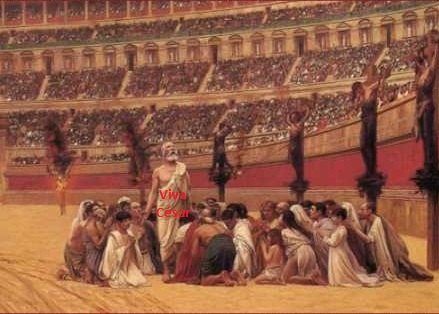
Repito, no estoy en contra de la financiación de eventos de software libre por parte de compañías privativas, siempre y cuando esta financiación no implique los riesgos que en ocasiones conlleva. Cuando la viabilidad de este tipo de eventos se sustenta en financiación privativa, se “puede” llegar a perder la libertad de decisión. “Si quieres ser libre de verdad, no hagas que tu estómago dependa de ello”.
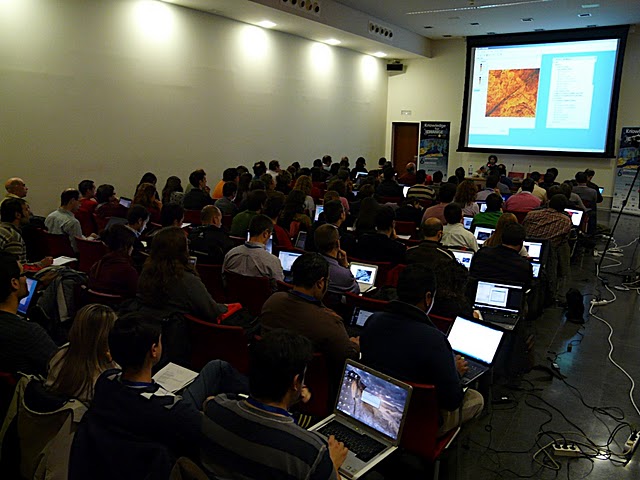
Más preocupante es la concesión de privilegios a los patrocinadores, cuando los patrocinadores no están vinculados al mundo del software libre. Hace unos meses me invitaron a hablar en el SASIG 2010 (Software Aberto para Sistemas de Informação Geográfica) o Jornadas de SIG Libre de Portugal, organizadas por OSGeo Portugal. No puedo más que hablar bien de la organización, una comunidad activa, con gente muy amable y capaz. En esas jornadas obtenían financiación de compañías locales que trabajan con software libre, y también de patrocinadores de software privativo, como alguno de los nombres que todos conocemos. Hasta aquí ningún problema. Sin embargo, se les concedió protagonismo a los patrocinadores (algo que, a pesar de ser patrocinador habitual de este tipo de eventos, no me gusta, aunque lo entiendo).
Es en este punto donde aparecen las incongruencias de un evento de difusión de software libre, al concederle 30 ó 40 minutos a compañías que nos lanzan sus mensajes desde el mundo privativo, y dejar a otros ponentes de software libre únicamente 5 minutos. Todos recordamos la famosa frase “ArcGIS is open” en el FOSS4G 2010, frase que se transformaba en la presentación calcada en SASIG en “ArcGIS e oberto”. Escuchar burradas por parte de otros, como que Oracle es FOSS4G porque tiene una versión gratuita, o asistir al magnífico sorteo de tres licencias de desarrollo del software X, no contribuyen en absoluto a la misión de este tipo de eventos: “Difundir y promover el uso del software libre”.
Una cosa es que alguna compañía libere algún producto residual en su aportación a su cifra de ingresos, bien por imagen o bien como huida hacia adelante; y otra que eso le otorgue un papel similar al de cualquier proyecto puntero de software libre. Desde aquí animo a los organizadores de eventos a medir las consecuencias de dejar a los romanos paganos brindar en las celebraciones cristianas y contarnos las excelencias de sus dioses. Dejemos que se conviertan poco a poco, o que sus resultados impongan un cambio de CEO, que derive en que, cual Constantino I el Grande, asuma el cristianismo, … quiero decir, el software libre.
Y dejemos que los eventos de software libre difundan sólo el software libre, y generalicen la voluntad de utilizar software libre. Ya lo decía Maquiavelo: “resulta tan difícil y peligroso querer hacer libre a un pueblo que quiera vivir siervo como querer hacer siervo a un pueblo que quiera vivir libre”. Así pues, hablemos al pueblo sólo de libertad.









 Alvaro
 Amparo Cisneros
 adelrey
 Alegria
 asoredesocial2006
 Augusta
 christinesig
 cordin
 csanper
 danielvicb
 dispiste
 edmarmoretti
 elenasanchez232
 eliazerk
 fjsolis
 Gabi
Gabi ggowtham
 Giuliano Ramat
 Valenty
 Georg Sedlmeir
 hydrologiclady
 jgalans
 Joaquin del Cerro
 Juan Lucas Domínguez Rubio
 jolicar
 josebadia
 Jorge Piera Llodrá
 Jordi Torres
 Chevi
Chevi learozz
 leoruizb
 Alonso Morilla
 Lluís Marqués
 martapacoret
 Óscar Martínez
 mateoboudon
 mateocb16000
 Mario
Mario Mario Chaveli
 mjlobato76
 Manuel
 mmontesinos
 moovida
 Nacho Varela
 nbrodin
 André
André piotrpachol
 psanxiao
 Sergio Acosta y Lara
 Spatioblog
 Sergio Acosta y Lara
 uliwerz
 Victor Acevedo
 Viqui
Viqui volaya