8as Jornadas de Latinoamérica y Caribe de gvSIG: Programa provisional de ponencias y talleres, e inscripciones

Ya está disponible el programa provisional con las ponencias que se van a dar en las 8as Jornadas de Latinoamérica y Caribe de gvSIG, que tendrán lugar los días 20 y 21 de octubre en Montevideo (Uruguay).

También se han abierto las inscripciones a los talleres, con cupos limitados, y que pueden hacerse desde el siguiente formulario. Los talleres que se realizarán, totalmente gratuitos, son los siguientes:

  • Base de Datos Geográfica – PostGIS
  • gvSIG avanzado
  • GeoServicios con GeoServer
  • R aplicado a lo espacial

Por otro lado, debido a problemas en el servidor de registro, la inscripción a las jornadas recomendamos se vuelva a realizar a través del siguiente formulario. Tanto si ya te habías registrado previamente como si no lo habías hecho aún, recomendamos que realices la inscripción de nuevo. Recordamos que las jornadas son gratuitas, y el aforo es limitado.

¡Os esperamos!

8as_J_LAC_gvSIG-home


Posted in community, events, spanish, training | Tagged | Leave a comment

Eulogy and risks of two new open source initiatives in Europe: Bulgaria and the Valencian Community.

open-hero_xxx

Two new legal initiatives to promote the use of open source have been announced in the last months, both of them aligned with the current European Union strategies like the Open Source Strategy and the ISA-Developing and sharing IT solutions for less bureaucracy.

One is the national initiative approved by the Bulgarian parliament for the mandatory use of open source for IT services contracts, and in particular for software to be used in its public administration. This legislation is a clear step towards higher technological independence via the development of local business and the reutilization of code by different government bodies, a decision that provides reassurance to their citizens that the electronic public administration functions adequately. Additional advantages of this measure include better security, a reduction of costs related to the acquisition and renewal of private licences – which are in most cases a dreadful monopoly – plus an increase of hardware longevity.

The other initiative is particularly beneficial to the gvSIG project, as it has been originated in the Valencian Community, the same region where the project was born and where its headquarters are. This initiative, the Mocion 12/IX which was seconded by all parties in the plenary session on 26th May 2016, seeks to promote the use of open software in the public administration of this region.

The reading of this new measure is highly recommendable as it is short and precise regarding further steps, which include the following: to define political actions and plans to promote the use of open source software in the autonomous administration; to incorporate clear guidance for the preferential use of open source in the digital transformation plan (Plan de Transformacion Digital) and all forthcoming information system projects; to promote the implementation of open licenses for  current and future contracts for the externalization of its information system and the support to business that follow the open source models, a decision that would open new business opportunities for the ICT Valencian SMEs; to prioritize the development of open source projects funded by the European Union funding schemes for open source initiatives.

Of special interest is the point noting the publication of biannual progress reports based on KPIs that would allow assessment according to independent criteria. Following on from this, the Consell has confirmed that it will report on the fulfillment of this measure after the six months of its approval. This announcement breaks new boundaries with regards to other legal initiates that lacked such clear monitoring commitment, an issue that was sadly present in previous open source initiatives.

When I previously discussed the concept of smart cities, which could now be extrapolated to include ‘smart government’, I explained the difference between political and technical decisions, and sated that opting for open software was a political decision similar to the choice between private or public road management. Up to now, once the legal framework was approved, the major difficulty stopping its practical implementation was usually the technicians in charge of its implementation. This resistance to change, which looks more like a preference for ease and inactivity instead of coping with the extra efforts required for implementing any changes, could be compared to the issues found during the abolition of slavery, which probably found arguments to the likes of making sure that the job was done as a way to oppose to it. This may sound like an exaggeration, but I myself have heard this type of argument for years, comments that exude apathy, lack of initiative and opposition to a change that is so clearly beneficial to all.

Therefore huge congratulations to the Bulgarian and Valencian citizens and well done to their politicians who have understood that technology is one of the major strategical sectors of the XXI century and who, consequently, have created laws to be able to control it, a decision only possible via open source software. Furthermore, I would also like to advise citizens, and particularly those working in open source associations and communities, and those SMEs who would benefit from this political measure, to monitor its implementation and evolution. This way we will avoid hearing excuses and the type of reluctance previously mentioned, and will be able to see the materialization of this policy in our daily lives.

Posted in Business, english, gvSIG Desktop, opinion, software libre | Tagged | Leave a comment

gvSIG busca traductores

gvsig_english_spanish

Hola a todos y todas. Como sabéis recientemente hemos publicado gvSIG 2.3, una nueva versión del SIG de escritorio en software libre plagada de novedades, tanto a nivel funcional como de scripting.

Tenemos pendiente publicar el manual de gvSIG 2.3, aunque ya lo tenemos prácticamente terminado en castellano. También hemos publicado en castellano la documentación de scripting…y ahora nos queda pendiente tener todo este material en inglés, lo que sin duda ayudará a divulgar y ampliar la comunidad de usuarios y desarrolladores de gvSIG Desktop en la comunidad angloparlante. Y a más comunidad, más rápido crecerá el proyecto y todos nos beneficiaremos de ello.

Para estas tareas de traducción os pedimos vuestra ayuda. Cuanto más seáis los voluntarios más rápido podrá disponer la comunidad de toda esta documentación en inglés. Aunque puedas dedicarle poco tiempo, siempre será bien recibida tú aportación.

Para colaborar simplemente escríbenos un correo a info@gvsig.com e indicanos si prefieres traducir documentación de usuario o de scripting.

¡Muchas gracias por adelantado!

Posted in community, spanish | Tagged , | 1 Comment

Vídeo del Seminario de introducción a la programación en gvSIG mediante scripting (Python)

¿Aprender a programar en gvSIG en 1 hora? Este vídeo ayuda a que así sea.

Y es que ya está disponible la grabación relativa a este webinar de introducción a la programación en gvSIG mediante scripting (Python) impartido como parte de las actividades del Máster Oficial en Valoración, Catastro y Sistemas de Información Territorial de la Universidad Miguel Hernández.

El objetivo de este seminario es conocer, mediante una serie de sencillos ejercicios prácticos, las posibilidades del módulo de scripting en gvSIG y el proceso de manipulación de datos espaciales para la creación de capas a partir de otras existentes.

Dentro vídeo…

Posted in gvSIG Desktop, spanish, training | Tagged , , , , | Leave a comment

Vídeos sobre las novedades de gvSIG 2.3

Ya están disponibles los vídeos relativos a los webinars sobre las novedades de de gvSIG Desktop 2.3. impartidos como parte de las actividades del Máster Oficial en Valoración, Catastro y Sistemas de Información Territorial de la Universidad Miguel Hernández.

Por un lado el vídeo en el que presentamos cada una de las novedades funcionales de gvSIG 2.3, con ejemplos de las nuevas herramientas disponibles en esta versión:

Por otro el vídeo sobre las novedades relativas al scripting en gvSIG 2.3. ¡Son tantas que dedicamos un webinar sólo a ellas!

Esperemos que os gusten.

Posted in gvSIG Desktop, spanish | Tagged , , | 1 Comment

Premios al software libre: gvSIG nominado en 4 categorías

trofeo_programa_sl

El reconocimiento al proyecto gvSIG se muestra de muy diversas formas y una de ella es su presencia en distintos premios. Hoy se han anunciado los nominados a los “Premios al software libre” de este año y gvSIG está presente en cuatro de las seis categorías existentes. Todo un éxito para la Asociación gvSIG que se suma a los galardones recientemente recibidos de la NASA.

Estos Premios que cuentan ya con ocho ediciones, están organizados por PortalProgramas, un canal de descarga de software con más de 12 años de experiencia y tienen como objetivo premiar a los programas que más han contribuido al avance tecnológico durante este año. Unos premios en los que la votación popular tiene bastante importancia.

En cuanto a las motivaciones de estos premios creo que se explica perfectamente con este texto extraído de la web:

Hemos crecido al lado del software libre y pensamos que es una apuesta de presente y de futuro que ayuda enormemente al desarrollo de la tecnología actual, aunque muchas veces de forma invisible, formando parte de otras tecnologías. Desde hace años apostamos por promocionar el software libre porque promoverlo es una forma de ayudar a la sociedad.

Pues bien, a partir de hoy día 4/10/2016 y hasta el 24/10/2016 podéis votar en cada una de las categorías a vuestro software favorito…¡que esperamos que sea tecnología made in gvSIG!

En cualquier caso y como dicen los organizadores, con este tipo de eventos no importa quien gane porque siempre gana el Software Libre.

Para votar a nuestros nominados os dejamos los enlaces directos. En cada uno de ellos podréis votar en la/s categoría/s a las que están nominados:

Posted in Geopaparazzi, gvSIG Desktop, spanish | Tagged , | 2 Comments

gvSIG 2.3 is now available!

The new version of gvSIG Desktop, the open source GIS, is now available to download.

This new version is an important step at the gvSIG evolution, because of its multiple improvements and novelties in a functional level as well as in an architecture one. 

You can download gvSIG 2.3 from here:

http://www.gvsig.com/en/products/gvsig-desktop/downloads

A here you have a list of novelties:

Distribution for Windows 64 bits.

This new distribution has been added to the existing ones: Windows 32 bits and Linux 32 and 64 bits, as installable and portable versions.

 001_23_xxx
 002_23_xxx Portable distribution for Mac OS X

We release this official distribution for users of this operating system for the first time.

More information: https://blog.gvsig.org/2016/09/14/towards-gvsig-2-3-portable-distribution-for-mac-os-x/ 

GDAL: projections and raster access library

From this version we use GDAL as projections and raster information access library.

One of the consequences of this change is the access to lots of new formats (MID/MIF de Mapinfo, Geojson, CityGML, etc.) through GDAL.

More information: in: https://blog.gvsig.org/2016/03/08/on-the-road-to-gvsig-2-3-new-available-formats-ogr-gdal/

 003_23_xxx

New installer with 64 bits support

New geometry library

More efficient support for multigeometries

Java 8 support

Automatic creator of gvSIG Debian de gvSIG

PRJ format (projections) reading and writing

It is a file that is attached to an information layer (shapefile, raster…) that has information about its coordinates reference system.

More information:

https://blog.gvsig.org/2016/03/08/on-the-road-to-gvsig-2-3-read-and-write-prj-files-projections/

 004_23_xxx
 005_23_xxx R: Statistics in gvSIG

R statistics library support through Renjin or integrating R directly.

More information:

https://blog.gvsig.org/2016/03/17/running-r-source-code-from-gvsig-2-3-through-renjin/

and here:

https://blog.gvsig.org/2016/09/29/towards-gvsig-2-3-r-extension

Lots of improvements in scripting

There are a lot of improvements in the Scripting module in gvSIG 2.3. Now it is very easy to develop in gvSIG

More information in these links (posts in Spanish will be translated soon):

https://blog.gvsig.org/2016/09/06/towards-gvsig-2-3-new-integration-at-the-scripting-libraries/

https://blog.gvsig.org/2016/08/31/camino-a-gvsig-2-3-compatibilidad-y-cambios-en-scripts/

https://blog.gvsig.org/2016/09/01/camino-a-gvsig-2-3-ejemplo-de-script-con-la-nueva-implementacion/

https://blog.gvsig.org/2016/09/05/camino-a-gvsig-2-3-insertar-nuevos-geoprocesos-mediante-scripting/

https://blog.gvsig.org/2016/09/12/camino-a-gvsig-2-3-nuevas-funcionalidades-en-el-scripting-composer/

https://blog.gvsig.org/2016/09/20/camino-a-gvsig-2-3-autoarranque-de-scripts-al-iniciar-gvsig/

 006_23_xxx
 007_23_xxx Dynamic segmentation/Linear Reference System (LRS)

Tool to work with this spatial reference method in which the positions of the elements are referred to measurements along a linear element.

This ability involves a set of tools that let define routes, calibrate each route from the milestones, edit the M coordinate of an element, depict it and generate new layers that support dynamic segmentation.

More information in these links:

https://blog.gvsig.org/2015/11/24/on-the-road-to-gvsig-2-3-dynamic-segmentation-lrs-i/

https://blog.gvsig.org/2016/02/18/on-the-road-to-gvsig-2-3-dynamic-segmentation-ii/

https://blog.gvsig.org/2016/02/22/on-the-road-to-gvsig-2-3-dynamic-segmentation-iii/

https://blog.gvsig.org/2016/02/26/on-the-road-to-gvsig-2-3-dynamic-segmentation-iv/

https://blog.gvsig.org/2016/02/27/on-the-road-to-gvsig-2-3-dynamic-segmentation-v/

https://blog.gvsig.org/2016/02/27/on-the-road-to-gvsig-2-3-dynamic-segmentation-vi-and-final/

https://blog.gvsig.org/2016/02/29/on-the-road-to-gvsig-2-3-dynamic-segmentation-in-4-videos/

Google Maps, Bing Maps and Street View

Possibility to add Google Maps and Bing Maps map services.

Access to Google Street View.

More information: https://blog.gvsig.org/2016/06/22/towards-gvsig-2-3-bing-maps-google-maps-and-google-street-view/ 

 008_23_xxx
 009_23_xxx New OpenStreetMap servers
Access to new OSM tile services, adding Stamen: Toner, Watercolor and Terrain.More information: https://blog.gvsig.org/2016/08/05/towards-gvsig-2-3-new-osm-openstreetmap-servers/ 
LiDAR data reading and writing 

LiDAR data support in .LAS format

More information: https://blog.gvsig.org/2016/06/20/towards-gvsig-2-3-lidar-data/

 010_23_xxx
 011_23_xxx CSV (Wizard) importer

A wizard makes CSV loading easy, as table as well as layer

More information: https://blog.gvsig.org/2016/08/08/towards-gvsig-2-3-csv-wizard-importer/

New editing tools

Editing module continues improving with 3 new tools: change sense, curve to polyline, and parallel line.

Distributions automatic generator

Plugin that allows to configure and create gvSIG distributions automatically for any operating system, customizing its working, OGC services, EPSG, appearance…

3D View improvements

2D to 3D views reprojection support

Vector data support in 3D views

3D animations

Extrusion

More information:

https://blog.gvsig.org/2016/06/20/towards-gvsig-2-3-reproject-2d-view-into-a-3d-view/

http://jgrasstechtips.blogspot.com.es/2016/06/extrusion-for-3d-vector-view-in-gvsig.html

 012_23_xxx
 013_23_xxx Anaglyphs

Possibility to view 3D Views in Anaglyph mode.

More information:

https://blog.gvsig.org/2016/09/09/towards-gvsig-2-3-anaglyph/

Animations

Animations generator for 3D Views.

More information: https://blog.gvsig.org/2016/09/06/towards-gvsig-2-3-3d-animations/

 014_23_xxx
 015_23_xxx

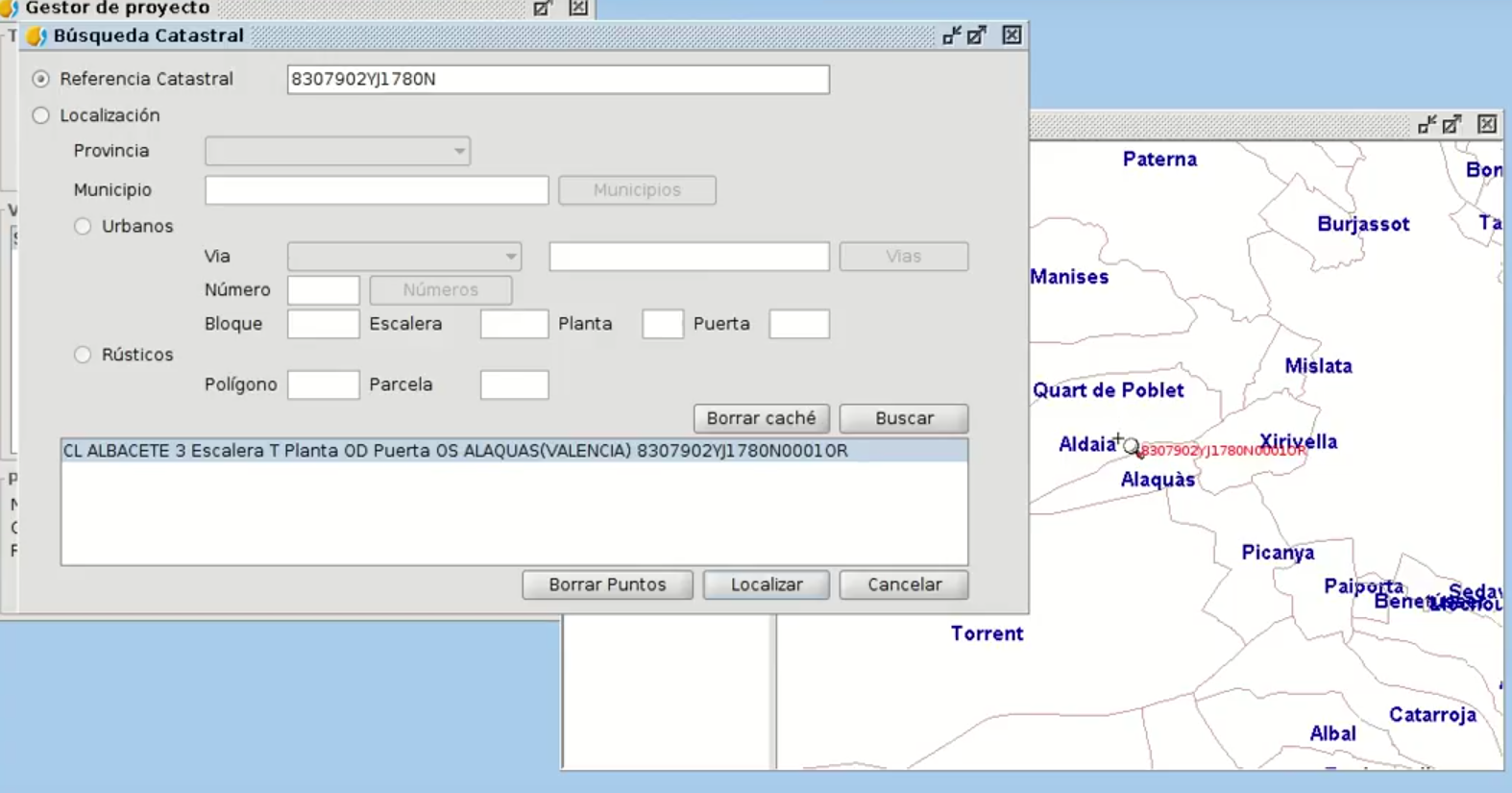
Cadastre browser (Spain)

Users in Spain will be able to look for parcels by cadastral reference or location.

More information: https://blog.gvsig.org/2016/06/02/camino-a-gvsig-2-3-buscador-de-referencias-catastrales-espana/

Bookmarks

We will have a dataset catalogue with the cartography that we usually use, and they will be able to be loaded in our Views in a quick way.

More information: https://blog.gvsig.org/2016/09/20/towards-gvsig-2-3-bookmarks/

 016_23_xxx

Automatic detection of heights

Building detection and height comparative between layers from LiDAR data

Online documentation

Online documentation available for users and developers

And we have to add several small improvements besides error correction (bugs) that have been identified. Here you have some of these small improvements: update of all the languages (more than 30), tool to add layers to locator from the ToC, Groovy version updated for scripting, new INSPIRE symbol libraries, usability improvements…

If you have read all this post, you sure will want to download and test the new version. From today we start to work in gvSIG Desktop 2.4, and the releasing phase will start in December.

Finally, we want to tell you that your help, although it is small, can be very important to continue improving gvSIG. We encourage you to collaborate:

https://blog.gvsig.org/2016/05/12/contributing-to-gvsig-or-bidirectional-collaboration/

Posted in development, english, gvSIG Desktop, testing, training | Tagged | 2 Comments

¡gvSIG 2.3 ya está aquí!

Ya está disponible para descarga la nueva versión de gvSIG Desktop, el SIG en software libre.

Esta versión supone un paso importante en la evolución de gvSIG 2.3, debido a las múltiples mejoras y novedades que presenta, tanto funcionales como a nivel de arquitectura.

Descarga gvSIG 2.3 desde aquí:

http://www.gvsig.com/es/productos/gvsig-desktop/descargas

Vamos con el listado de novedades:

Distribución para Windows 64 bits.

A las de ya existentes de Windows 32 bits (y las correspondientes a Linux de 32 y 64 bits) se suma esta nueva distribución, tanto en modalidad instalable como portable.

 001_23_xxx
 002_23_xxx Distribución portable para Mac OS X

Publicamos por primera vez una distribución oficial para los usuarios de este sistema operativo.

Más info: https://blog.gvsig.org/2016/09/01/camino-a-gvsig-2-3-distribucion-portable-para-mac-os-x/

GDAL: librería de acceso a ráster y proyecciones

A partir de esta versión utilizamos GDAL como librería de acceso a información ráster y proyecciones.

Una de las consecuencias de este cambio es el acceso a través de OGR/GDAL a decenas de nuevos formatos (MID/MIF de Mapinfo, Geojson, CityGML, etc.)

Más información en: https://blog.gvsig.org/2016/03/04/camino-a-gvsig-2-3-nuevos-formatos-disponibles-ogrgdal/

 003_23_xxx

Nuevos instalador con soporte para 64 bits

Nueva librería de geometrías

Soporte más eficiente de multigeometrías

Soporte Java 8

Generador automático de paquetes Debian de gvSIG

Lectura/escritura de ficheros PRJ

Capacidad de lectura y escritura de ficheros PRJ. Es un fichero que va asociado a una capa de información (shapefile, ráster…) y que contiene información sobre el sistema de referencia de coordenadas de dicha capa.

Más info:

https://blog.gvsig.org/2016/03/03/camino-a-gvsig-2-3-lecturaescritura-de-ficheros-prj-proyecciones/

 004_23_xxx
 005_23_xxx R: Estadística en gvSIG

Soporte de la librería de estadística R tanto a través de Renjin como integrando directamente R.

Más info:

https://blog.gvsig.org/2016/03/15/ejecutando-codigo-de-r-desde-gvsig-2-3-mediante-renjin/

Y aquí:

https://blog.gvsig.org/2016/09/29/camino-a-gvsig-2-3-extension-de-r/

Mejoras y más mejoras de scripting

Son muchas las mejoras que encontramos en gvSIG 2.3 en cuanto a scripting, cuyo potencial explota con esta versión. Nunca fue tan fácil desarrollar en gvSIG.

Más info en los siguientes enlaces:

https://blog.gvsig.org/2016/08/12/camino-a-gvsig-2-3-nueva-integracion-en-las-librerias-de-scripting/

https://blog.gvsig.org/2016/08/31/camino-a-gvsig-2-3-compatibilidad-y-cambios-en-scripts/

https://blog.gvsig.org/2016/09/01/camino-a-gvsig-2-3-ejemplo-de-script-con-la-nueva-implementacion/

https://blog.gvsig.org/2016/09/05/camino-a-gvsig-2-3-insertar-nuevos-geoprocesos-mediante-scripting/

https://blog.gvsig.org/2016/09/12/camino-a-gvsig-2-3-nuevas-funcionalidades-en-el-scripting-composer/

https://blog.gvsig.org/2016/09/20/camino-a-gvsig-2-3-autoarranque-de-scripts-al-iniciar-gvsig/

 006_23_xxx
 007_23_xxx Segmentación dinámica (Sistema de referencia lineal)

Herramientas para trabajar con este tipo de referencia espacial en el que las ubicaciones de los elementos están referidos a través de medidas a lo largo de un elemento lineal.

En gvSIG 2.3 encontramos herramientas que permiten definir las rutas, calibrar cada ruta a partir de los hitos kilométricos, editar la coordenada M de un elemento, representar dicha coordenada M y generar nuevas capas con segmentación dinámica.

Más info en los siguientes enlaces:

https://blog.gvsig.org/2015/11/19/camino-a-gvsig-2-3-segmentacion-dinamica-i/

https://blog.gvsig.org/2015/11/20/camino-a-gvsig-2-3-segmentacion-dinamica-ii/

https://blog.gvsig.org/2015/11/23/camino-a-gvsig-2-3-segmentacion-dinamica-iii/

https://blog.gvsig.org/2015/11/24/camino-a-gvsig-2-3-segmentacion-dinamica-iv/

https://blog.gvsig.org/2015/11/25/camino-a-gvsig-2-3-segmentacion-dinamica-v/

https://blog.gvsig.org/2015/11/26/camino-a-gvsig-2-3-segmentacion-dinamica-vi-y-final/

https://blog.gvsig.org/2015/12/09/camino-a-gvsig-2-3-segmentacion-dinamica-en-4-videos/

Google Maps, Bing Maps y Street View

Capacidad para añadir servicios de mapas de Google Maps y Bing Maps.

Acceso a Google Street View.

Más info: https://blog.gvsig.org/2016/06/03/camino-a-gvsig-2-3-bing-maps-google-maps-y-google-street-view/

 008_23_xxx
 009_23_xxx Nuevos servidores de OpenStreetMap

Acceso a nuevos servicios de tiles OSM, añadiendo los de Stamen: Toner, Watercolor y Terrain.

Más info: https://blog.gvsig.org/2016/08/05/camino-a-gvsig-2-3-nuevos-servidores-osm-openstreetmap/

Lectura y escritura de datos LiDAR

Soporte de datos LiDAR en formato .LAS

Más info: https://blog.gvsig.org/2016/06/16/camino-a-gvsig-2-3-datos-lidar/

 010_23_xxx
 011_23_xxx Asistente para carga de datos CSV

Un asistente facilita la carga de ficheros CSV, tanto como tablas como capas

Más info: https://blog.gvsig.org/2016/08/07/camino-a-gvsig-2-3-importador-de-csv-wizard/

Nuevas herramientas de edición

Sigue mejorando la potente edición en gvSIG con 3 nuevas herramientas: invertir sentido de línea, generar líneas paralelas y convertir curvas a polilíneas.

Generador automático de distribuciones

Plugin que permite configurar y generar automáticamente distribuciones de gvSIG para cualquier sistema operativo personalizando su funcionalidad, servicios OGC, EPSG, apariencia….

Mejoras en Vistas 3D

Soporte de reproyección de Vistas 2D a Vistas 3D.

Soporte de datos vectoriales en Vistas 3D.

Extrusión en Vistas 3D.

Más info:

https://blog.gvsig.org/2016/06/10/camino-a-gvsig-2-3-reproyectar-vistas-2d-a-vistas-3d/

https://blog.gvsig.org/2016/06/20/camino-a-gvsig-2-3-soporte-vectorial-en-vistas-3d-y-extrusion/

 012_23_xxx
 013_23_xxx Anaglifos

Posibilidad de ver en modo anaglifo las Vistas 3D en gvSIG.

Más info:

https://blog.gvsig.org/2016/08/30/camino-a-gvsig-2-3-anaglifos/

Animaciones

Incorpora un generador de animaciones para Vistas 3D.

Más info: https://blog.gvsig.org/2016/08/30/camino-a-gvsig-2-3-animaciones/

 014_23_xxx

Buscador de Catastro (España)

Los usuarios de España encontrarán muy útil esta funcionalidad que permite realizar búsquedas catastrales por referencia catastral o localización.

Más info: https://blog.gvsig.org/2016/06/02/camino-a-gvsig-2-3-buscador-de-referencias-catastrales-espana/

 015_23_xxx
 016_23_xxx Catálogo de favoritos

Catálogo de fuentes de datos que solemos utilizar y que queremos que estén disponibles para poder añadirlas a nuestras Vistas de la forma más rápida posible.

Más info: https://blog.gvsig.org/2016/09/19/camino-a-gvsig-2-3-catalogo-de-favoritos/

Detección automática de alturas

Detección de edificios y comparación de alturas entre capas a partir de datos LiDAR.

Documentación en línea

Disponible documentación para desarrollo y usuarios en línea.

Y a esto debemos añadir decenas de pequeñas mejoras además de la corrección de errores (bugs) que se han ido identificando. Algunos ejemplos de estas mejoras: actualización a los más de 30 idiomas disponibles, añadir localizador desde el TOC, actualización de la versión de Groovy para scripting, nueva biblioteca de símbolos INSPIRE, mejoras de usabilidad, etc.

Si has llegado al final del post seguro que estás deseando descargarte y probar la nueva versión. Nosotros desde hoy mismo comenzamos a trabajar en gvSIG Desktop 2.4, cuya fase de publicación empezaremos en diciembre de este año.

Por último comentar que tú ayuda, por pequeña que sea, puede ser muy importante para continuar mejorando gvSIG. Te animamos a que colabores con el proyecto:

https://blog.gvsig.org/2016/05/09/contribuir-a-gvsig-o-la-colaboracion-bidireccional/

Posted in gvSIG Desktop, spanish, testing | Tagged | 10 Comments

Towards gvSIG 2.3: R extension

One of the last developments in gvSIG, is the possibility to run R code from gvSIG. Now, we are not talking about the partial solution through Renjin, as we explained in a post, but a R installation that will be installed in our extension.

What is R?

R is a programming language focused on statistical computing. It has a huge and active community who developed a lot of projects and libraries using this language. One of the libraries that could be interesting for you is ‘rgdal‘. Using this library we could work with vector data, raster data, etc. It gives the chance to put together both worlds, statistical and geospatial ones.

For those who don’t know R and all the chances that it has, I recommend you to take a look in Google and look for all these projects with “R language” involved.

What is needed in R to be more useful in our field?

One of the lacks of R is a graphical environment focused on geospatial information. Of course, R has graphic output, map generation, but not all the functions that one desktop GIS could have, like gvSIG, where we have multiple options to visualize and interact with our data, or even creating our own tools like creating geoprocesses that involve part of the analysis in R.

What is the objective of this extension?

The main objective of this extension is to take advantage of the best of R, statistical analysis, and the best of gvSIG, layer interaction and visualization.

In a technical level, we could create a function, written in R, and using gvSIG to pass the parameters that it needs, and an environment where we can load the results, where we can continue working with them.

For example, we could have a script in R, that gets parameters as a path of a layer who is loaded in gvSIG, then processing this layer in R applying some statistical calculation or reprojections, and again, loading the output layer or table of the process in gvSIG.

Maybe these parameters are not fixed as a layer, but they could be X, Y coordinates that could be captured after a click event in a View inside gvSIG. The options are endless.

What R are we using it?

gvSIG is using an R installation inside the plugin. For example, it will allow us to have everything installed in a gvSIG portable version, and we will not need an external installation outside gvSIG. We continue developing this plugin so we keep studying some other alternatives to this behaviour.

What limitations do we have?

Right now we recommend to use the extension in Windows, because in this platform the library installation is easy to do inside R. We also put in some pre-installed packages with the main libraries in the geospatial R world. However, you also can use this extension in Linux, following the same steps except the library installation.

How can we test it?

We have included a basic example of R use, in which one we use the scripting module to execute this R script, giving to R some parameters, and getting them to load the results.

This example is made in Windows, but you can try it also in Linux, just remember to download the Linux version of the package.

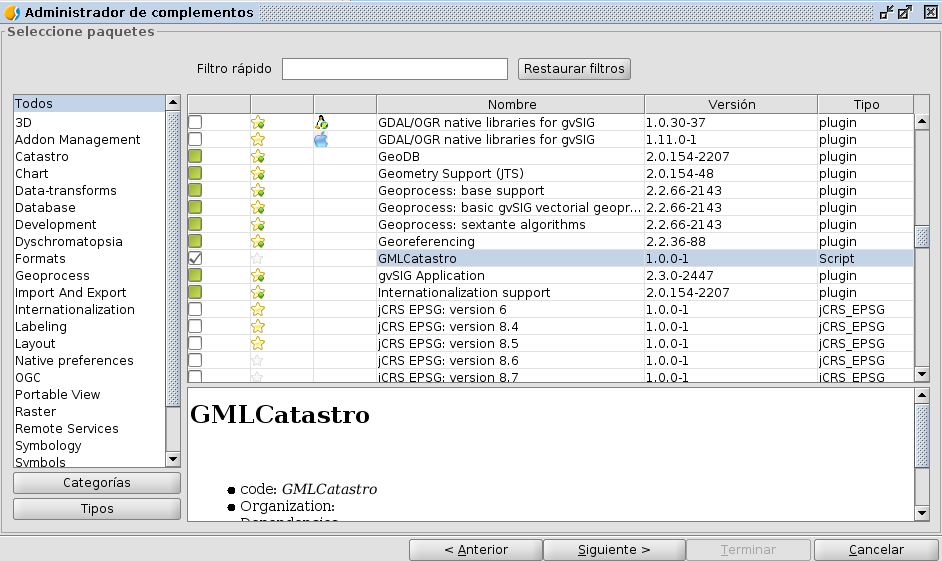
First of all we have to install the R extension from the Add-ons Manager. If we are using a portable version, it won’t be needed.

2016-09-19-15_52_34-r_16

Select the Windows package version:

2016-09-19-15_52_34-r_17

And press ‘Start download’:

2016-09-19-15_52_34-r_18

We have to press Next to complete the installation. It could take a while because of the package size:

2016-09-19-15_52_34-r_19

Once it is installed, we should restart gvSIG.

Having gvSIG opened again, for our example, we have to create a new View with EPSG 25830 projection, to load here our data.

Now we will go to Tools – Scripting – Scripting Composer:

2016-09-19-15_52_34-r_20

On the System menu, we could find our R plugin:

2016-09-19-15_52_34-r_21

We will execute the RShell script to open the R console that is inside gvSIG:

2016-09-19-15_52_34-r_22

Press the button:

2016-09-19-15_52_34-r_23

It will open a console like in the image, that correspond with the R environment that is inside gvSIG:

2016-09-19-15_49_18-r_11

The libraries that are at this installation are the next ones:

install.packages(c(
 'stpp','rgdal','maptools','splancs','spatstat','mgcv','BB','bbmle','plyr','raster',
 'sqldf','lubridate','rgeos','RPostgreSQL','RODBC','pixmap','sp','spdep','RColorBrewer',
 'foreign','plotrix','geoR','fields','maps', 'gridExtra','tweet2r','ggmap','ROAuth','RSQLite',
 'ggplot2','streamR', 'scales'
 ))
 install.packages('INLA', repos='http://www.math.ntnu.no/inla/R/stable')

If you need to install a new package to execute some of your scripts, you just will need to execute this command on the console:

install.packages("libraryName")

2016-09-19-15_50_07-r_12

Now, we are going to execute our R script. On the Test folder we will find an R example code:

2016-09-19-15_52_34-r_24

If we execute it, we will see all the data over the Scripting Composer console:

2016-09-19-15_52_34-r_25

This script is executing the R code script that we have inside the /data/ folder. Also, we can edit this script directly from the Scripting Composer.

2016-09-19-15_52_34-r_26

Detail of the output console:

2016-09-19-15_52_34-r_17

If we open our View, we will see a raster layer. This layer has been generated in R, and loaded in gvSIG.

2016-09-19-15_52_34-r_18

And this is the end of the post. We continue developing this module, any feedback or help from you would be appreciated. We hope to keep posting new updates from the new development in this extension.

Any doubt you can contact us in the User or Developer mail list.


Posted in development, english, gvSIG Desktop, gvSIG development, scripting | Tagged | 1 Comment

Camino a gvSIG 2.3: Extensión de R

Uno de los últimos desarrollos desde gvSIG, es la posibilidad de ejecutar código de R desde gvSIG. Y no estamos hablando de la solución parcial de Renjin como ya comentamos en un post hace tiempo, sino sobre un R que vendrá instalado en nuestra extensión.

¿Qué es R?

R es un lenguaje orientado principalmente para el análisis estadístico, que viene con una comunidad muy grande y activa en la que se realizan todo tipo de proyectos y se desarrollan todo tipo de librerías. Una de las librerías que nos interesa mucho es ‘rgdal‘, en la cual podemos trabajar con capas vectoriales, raster, etc, y que nos otorga la posibilidad de unir dos mundos, el geoespacial y el estadístico.

Para los que no conozcan R y toda las posibilidades que contrae este lenguaje, os animo a hacer una búsqueda rápida por Google y seguro que no os arrepentiréis de conocer este lenguaje .

¿Qué le falta a R para aplicarse a nuestro campo de trabajo?

Una de las carencias de R es la de un entorno enfocado al mundo geoespacial. Por supuesto que tiene salida gráfica, generación de mapas, etc, pero no todas las funciones que pudiera tener un SIG de escritorio como gvSIG donde tenemos la posibilidad de visualizar e interactuar con nuestras capas o de generar nuestras propias herramientas, incluyendo geoprocesos con una componente realizada en R.

¿Qué objetivo tiene esta extensión?

El objetivo de esta extensión es el poder aprovechar el fuerte de R que es el cálculo de datos y procesos, y el fuerte de gvSIG que es la interacción entre capas.

Poniéndonos más técnicos, podemos crear una función escrita en R, con sus datos de entrada y sus resultados, y utilizar gvSIG para pasarle a este función los parámetros que necesita, y el otorgarle un espacio donde cargar las capas de resultado donde seguir trabajando con ellas.

Por poner un ejemplo general, podríamos tener un script de R el cual recibirá de parámetros la ruta de una capa cargada y generada en gvSIG (tal vez resultado de un geoproceso), procesarla en R para sacar ciertos cálculos estadísticos sobre los atributos que contiene o algún tipo de transformación, y volver a cargar en gvSIG la capa o tabla resultado de esa transformación para su directa visualización.

Tal vez los parámetros que necesitase el script de R fuera un par de coordenadas X,Y que podríamos capturar al hacer click sobre un Vista. Las opciones son infinitas.

¿Qué R estará usando?

La extensión que estamos preparando viene con un R instalado en ella, esto permitirá por ejemplo, que con una versión portable de gvSIG tengamos ya todo lo necesario para trabajar directamente con R, sin necesidad de instalaciones externas. Solo con descomprimir el programa, tendremos acceso a todo su potencial. Pero seguimos con el desarrollo de la extensión y sacaremos más post sobre esto y posibles alternativas.

¿Qué limitaciones tiene en este momento?

Ahora mismo estamos recomendando su uso y prueba sobre Windows, ya que es la plataforma donde más sencilla es la instalación de librerías. De todas formas, tanto en las versiones de Windows y Linux hemos incluido una serie de paquetes preinstalados que pueden servir para hacer nuestras primeras pruebas.

¿Cómo probarlo?

Hemos incluido un ejemplo del uso básico de R, en el cual usamos scripting en Python para la ejecución y el pase de parámetros a R, además de para la carga de sus resultados, en este caso, una capa raster.

Este ejemplo está en Windows, pero al no tener que instalar librerías nuevas podría ser replicado también para Linux, tan solo descargando el paquete de la extensión correspondiente.

Primero, tendremos que instalar la extensión de R desde el Administrador de Complementos. Si estamos usando una portable de las últimas versiones de gvSIG, ya debería de venir instalada.

2016-09-29-09_01_02-r1

Seleccionamos el paquete correspondiente a la versión de Windows:

2016-09-29-09_01_45-r2

Y damos a “Comenzar descarga”.

2016-09-29-09_02_17-r3

Tendreomos que presionar siguiente para la instalación del paquete y concluirá así. Es posible que tarde un poco por el tamaño de la extensión:

2016-09-29-09_10_11-r4

Una vez instalado el paquete, tendremos que reiniciar gvSIG.

Con gvSIG abierto de nuevo, lo primero que haremos es crear una Vista nueva con proyección 25830, que al acabar será usada para cargar los datos del script de ejemplo que explicaremos.

Ahora nos iremos a Herramientas – Scripting – Editor de Scripts:

2016-09-19-15_41_45-r_7

En la pestaña de Sistema nos aparecerá el plugin sobre R que hemos instalado:

2016-09-19-15_46_51-r_8

Ejecutaremos el siguiente script para abrir la consola de R de la instalación correspondiente a gvSIG:

2016-09-19-15_47_30-r_9

Ejecutamos con el botón:

2016-09-19-15_47_51-r_10

Se abrirá una consola similar a la siguiente, que corresponde al entorno de R (recordando que es el instalado en gvSIG, totalmente independiente al que podríais tener instalado en vuestro ordenador):

2016-09-19-15_49_18-r_11

En principio, las librerías que vienen pre-instaladas hacen referencia al siguiente comando:

install.packages(c(
 'stpp','rgdal','maptools','splancs','spatstat','mgcv','BB','bbmle','plyr','raster',
 'sqldf','lubridate','rgeos','RPostgreSQL','RODBC','pixmap','sp','spdep','RColorBrewer',
 'foreign','plotrix','geoR','fields','maps', 'gridExtra','tweet2r','ggmap','ROAuth','RSQLite',
 'ggplot2','streamR', 'scales'
 ))
 install.packages('INLA', repos='http://www.math.ntnu.no/inla/R/stable')

Sino solo tienes que instalar los paquetes necesarios que necesitéis de la forma habitual en esta consola, de esta forma ya podrían usarse desde los scripts ejecutados desde gvSIG. Solo hay que escribir:

install.packages("nombreLibreria")

2016-09-19-15_50_07-r_12

Ahora pasamos a la ejecución de un script de R que tengamos. En la carpeta de test tenemos un ejemplo muy básico:

2016-09-19-15_52_34-r_15

Si lo ejecutamos veremos la salida de datos por consola:

2016-09-19-15_52_34-r_16

Este script lo que está realizando es la ejecución de un script en R que tenemos en la carpeta /data/ y que también podemos editar desde gvSIG:

2016-09-29-09_18_49-r5

La salida por consola más al detalle:

2016-09-19-15_52_34-r_17

Si volvemos a nuestra Vista, veremos la capa raster generada en R y cargada en gvSIG:

2016-09-19-15_52_34-r_18

Y hasta aquí el post de hoy. El módulo sigue en desarrollo y cualquier aportación será bien recibida. Esperamos postear próximamente algunos avances que hemos realizado en el uso de la extensión.

Cualquier duda podéis poneros en contacto con nosotros en las Listas de Usuarios o Desarrolladores.


Posted in development, gvSIG Desktop, gvSIG development, scripting, spanish | Tagged | 2 Comments